Migrating data from an existing business system to Odoo can be one of the most important—and challenging—parts of an Odoo ERP implementation. Whether you are moving from spreadsheets, an older ERP, QuickBooks, SAP, Microsoft Dynamics, NetSuite, Salesforce, or another business application, a well-planned Odoo data migration strategy is essential for a successful implementation.
Businesses often assume that data migration simply means exporting information from the old system and importing it into Odoo. In reality, a successful migration involves data analysis, cleansing, mapping, transformation, validation, testing, and reconciliation.
At Mediod Consulting Pvt Ltd, we help businesses plan and execute structured Odoo migrations while minimizing data loss, duplication, and operational disruption.
This guide explains how to migrate your existing business data to Odoo and what you should consider before going live.
What Is Odoo Data Migration?
Odoo data migration is the process of transferring business information from an existing system into Odoo while preserving data accuracy, relationships, and business history.
Depending on your business requirements, the migration may include:
- Customers and contacts
- Vendors and suppliers
- Products and product variants
- Pricelists
- Sales orders
- Purchase orders
- Invoices
- Payments
- Accounting data
- Chart of accounts
- Opening balances
- Inventory quantities
- Stock movements
- Employees
- Attendance records
- Timesheets
- Projects and tasks
- CRM leads and opportunities
- Manufacturing data
- Bills of materials
- Website and ecommerce information
- Historical transactions
- Attachments and documents
The exact migration scope depends on your existing system, Odoo version, modules being implemented, and how much historical information your business needs.
Why Is Data Migration Important in an Odoo Implementation?
Your ERP contains some of your company’s most valuable operational information.
If data is migrated incorrectly, problems can appear after go-live:
- Duplicate customers
- Incorrect product information
- Wrong inventory quantities
- Missing invoices
- Incorrect accounting balances
- Broken relationships between documents
- Missing historical transactions
- Incorrect tax configuration
- Incorrect payment information
- Reporting discrepancies
A poorly executed migration can therefore affect not only your Odoo implementation but also accounting, inventory, sales, purchasing, CRM, and management reporting.
A professional migration process focuses on moving the right data, rather than simply moving all available data.
Can I Migrate Data from My Existing ERP to Odoo?
Yes. Odoo can receive data from many different systems, but the migration method depends on the source system and the complexity of the data.
Common migration scenarios include:
Excel or CSV to Odoo
Small businesses frequently store customer, product, inventory, or sales information in Excel spreadsheets.
Odoo’s import functionality can be used for many straightforward datasets.
Legacy ERP to Odoo
If your company is replacing an older ERP system, the migration may require custom scripts or APIs because the source system’s data structure may be very different from Odoo’s architecture.
QuickBooks to Odoo
Accounting data requires special attention because financial information must remain consistent with the company’s accounting structure, taxes, journals, and opening balances.
SAP to Odoo
Large ERP migrations can involve substantial amounts of historical and transactional data. A detailed migration plan and reconciliation process are usually required.
Microsoft Dynamics to Odoo
Dynamics data may need to be extracted, transformed, mapped, and imported into the corresponding Odoo models.
NetSuite to Odoo
A NetSuite-to-Odoo migration can involve customers, vendors, products, invoices, payments, accounting information, inventory, and historical transactions.
Custom Software to Odoo
If your existing system was developed specifically for your company, migration often requires custom development to extract and transform the data.
Step 1: Analyze Your Existing System
Before importing anything into Odoo, understand what information currently exists in your system.
Start by identifying:
- What data do you have?
- Where is the data stored?
- Which records are still required?
- How many records exist?
- Which records are duplicates?
- Which fields are mandatory?
- Which historical transactions must be retained?
- Which information is obsolete?
- What relationships exist between records?
For example, your existing system might have:
Customer → Sales Order → Invoice → Payment
Odoo needs these relationships to be preserved correctly where historical transactional migration is required.
Simply importing customer names and invoices independently can result in incomplete or disconnected data.
Step 2: Define the Odoo Migration Scope
One of the biggest mistakes businesses make is trying to migrate everything.
Before migration, divide your data into categories.
Essential master data
This commonly includes:
- Customers
- Vendors
- Products
- Employees
- Accounts
- Taxes
- Pricelists
- Payment terms
Opening data
Depending on the implementation, you may need:
- Opening accounting balances
- Opening inventory
- Open sales orders
- Open purchase orders
- Open invoices
- Customer balances
- Vendor balances
Historical data
Historical information may include:
- Previous sales orders
- Purchase orders
- Invoices
- Payments
- Stock movements
- CRM activities
Not every company needs all historical data inside the new Odoo database.
Sometimes keeping historical data in an archive is more cost-effective than migrating several years of transactions.
Step 3: Clean Your Existing Data
Data cleansing is one of the most important steps in an Odoo migration.
If your existing database contains incorrect information, moving that information into Odoo will not solve the problem.
For example, you might have:
| Existing Data | Problem |
|---|---|
| ABC GmbH | Duplicate customer |
| ABC GmbH. | Duplicate customer |
| ABC Germany | Same company |
| info@abc.de | Incorrect email |
| +49 123… | Inconsistent phone format |
Before migration, identify and resolve:
- Duplicate records
- Missing information
- Incorrect email addresses
- Incorrect tax numbers
- Invalid addresses
- Duplicate products
- Inconsistent product names
- Incorrect units of measure
- Old customers
- Obsolete products
- Incorrect account mappings
This process is commonly referred to as data cleansing or data cleaning.
Step 4: Map Your Existing Data to Odoo
Data mapping determines where information from your existing system should go in Odoo.
For example:
| Existing System | Odoo |
|---|---|
| Customer Name | Contact → Name |
| Customer Email | Contact → Email |
| Customer Phone | Contact → Phone |
| Product Code | Product → Internal Reference |
| Product Name | Product → Name |
| Sales Order Number | Sales Order → Reference |
| Invoice Number | Invoice → Number |
| Tax Code | Tax → Tax Configuration |
This sounds straightforward, but complex migrations can involve hundreds of fields and multiple related Odoo models.
For example, an existing product might contain:
- SKU
- Product name
- Category
- Cost
- Sales price
- Supplier
- Barcode
- Weight
- Dimensions
- Tax
- Multiple variants
Each field needs to be mapped correctly to Odoo.
Step 5: Decide Between Odoo Import and Custom Migration
Not every migration requires custom development.
Option 1: Odoo Import
Odoo’s standard import functionality is suitable for many simple datasets.
It can be useful for:
- Customers
- Vendors
- Products
- Contacts
- Pricelists
- Basic inventory data
- Other structured records
This approach can be economical for smaller implementations.
Option 2: API-Based Migration
For larger or more complex systems, APIs can be used to extract and transfer data.
This approach is useful when:
- The source system has an API
- There are thousands of records
- Data relationships must be preserved
- Migration needs to be repeatable
- Automated transformations are required
Option 3: Custom Migration Scripts
Custom migration scripts can be developed when the source system and Odoo have significantly different data structures.
A custom migration can:
- Extract data
- Transform data
- Clean data
- Map fields
- Create records in Odoo
- Validate relationships
- Generate migration reports
For complex ERP migrations, this approach often provides greater control.
Step 6: Configure Odoo Before Migrating Data
Data should not normally be migrated into an incorrectly configured Odoo database.
Before migration, configure the required Odoo applications and business rules.
Depending on the project, this may include:
- Accounting
- Sales
- Purchase
- Inventory
- CRM
- Manufacturing
- Project
- HR
- Payroll
- Website
- Ecommerce
You may also need to configure:
- Fiscal positions
- Taxes
- Journals
- Payment terms
- Warehouses
- Locations
- Units of measure
- Product categories
- Pricelists
- Sales teams
- User access rights
The migration should fit the final Odoo architecture.
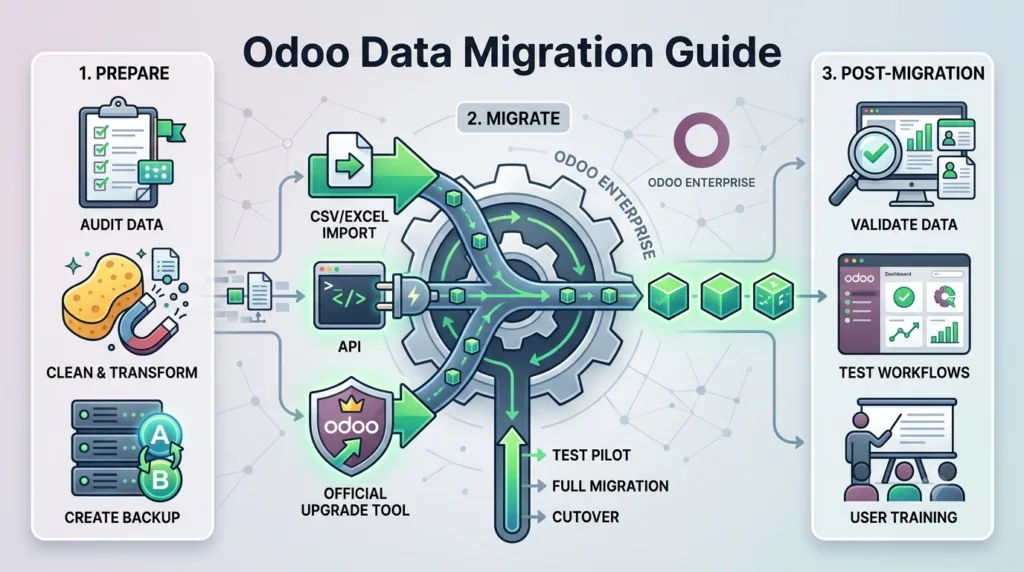
Step 7: Perform a Test Migration
Never make your first migration the production migration.
A test migration should be performed first.
A typical test migration looks like this:
Source System → Data Extraction → Data Cleaning → Transformation → Odoo Test Database → Validation
During testing, check whether:
- Customers were imported correctly
- Products are correct
- Product variants work
- Prices are correct
- Taxes are correct
- Sales orders are linked correctly
- Invoices are correct
- Inventory quantities are accurate
- Accounting balances reconcile
- Attachments are available
- User permissions work
Testing allows problems to be identified before they affect the live system.
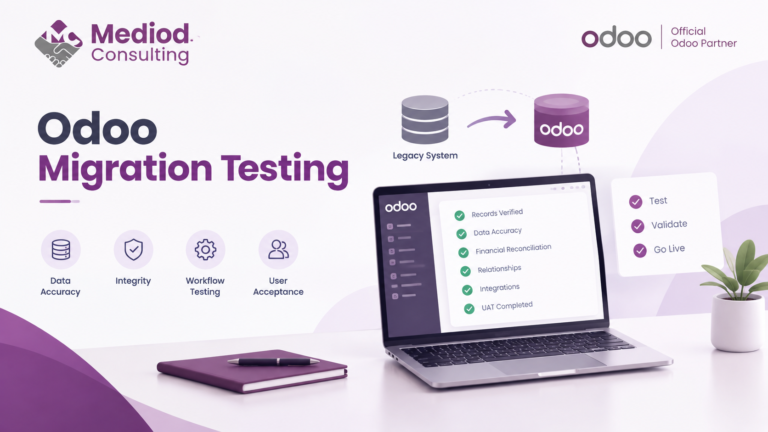
Step 8: Validate the Migrated Data
Data validation is critical.
Do not assume that an import was successful simply because Odoo did not display an error.
Compare the source system with Odoo.
For example:
Source System
Customers: 5,250
Products: 2,140
Open invoices: 183
Inventory value: €425,000
Odoo
Customers: 5,250
Products: 2,140
Open invoices: 183
Inventory value: €425,000
The numbers should be reconciled where applicable.
For accounting migrations, validation should go beyond record counts.
Check:
- Trial balance
- Accounts receivable
- Accounts payable
- Bank balances
- Customer balances
- Vendor balances
- Tax balances
- Opening balances
For inventory, compare:
- Quantity by product
- Quantity by warehouse
- Stock valuation
- Product locations
- Lots and serial numbers where required
Step 9: Plan the Final Odoo Migration
Once the test migration has been successfully validated, prepare the production migration.
A typical migration plan includes:
Before migration
- Freeze the migration scope
- Clean the final dataset
- Backup the existing system
- Confirm Odoo configuration
- Confirm user access
- Document the migration process
During migration
- Export final data
- Transform the data
- Import or process the migration
- Run validation checks
- Reconcile financial and operational data
After migration
- Perform business-user testing
- Validate reports
- Check open transactions
- Confirm inventory
- Confirm accounting
- Resolve migration issues
- Prepare users for go-live
Should You Migrate All Historical Data to Odoo?
Not necessarily.
This is an important decision during an Odoo ERP migration.
Suppose your company has 15 years of historical transactions.
Migrating all 15 years might require significant development and testing.
Instead, you could migrate:
- Current customers
- Current vendors
- Current products
- Open invoices
- Open sales orders
- Open purchase orders
- Current inventory
- Required accounting balances
And keep older transactions in your previous system or an accessible archive.
The correct approach depends on:
- Legal requirements
- Accounting requirements
- Reporting requirements
- Business requirements
- Data volume
- Migration budget
- Technical complexity
A good Odoo consultant should help you decide what should be migrated and what should be archived.
Common Odoo Data Migration Mistakes
1. Migrating Dirty Data
Moving incorrect or duplicate information into Odoo simply creates a cleaner-looking system containing the same underlying problems.
2. Migrating Without a Data Mapping Strategy
Without proper mapping, fields can end up in the wrong Odoo models or contain incorrect values.
3. Ignoring Accounting Reconciliation
Accounting data requires much more than importing invoices.
Balances must be reconciled and validated.
4. Testing Only Once
A single test migration is often not enough for complex projects.
Multiple migration iterations may be necessary.
5. Migrating Too Much Historical Data
More data does not necessarily mean a better ERP.
Only migrate information that provides business value or is required for compliance and reporting.
6. Forgetting Attachments
Documents and attachments can be overlooked during migration.
If your business relies on invoices, contracts, product documents, or other attachments, include them in the migration plan.
7. Not Planning for the Cutover
The final migration needs a clear cutover strategy.
You need to decide when the old system stops accepting new transactions and when Odoo becomes the system of record.
How Long Does Odoo Data Migration Take?
There is no universal timeline.
The migration duration depends on:
- Number of records
- Number of Odoo applications
- Source system
- Data quality
- Historical data requirements
- Customizations
- API availability
- Accounting complexity
- Number of integrations
- Required testing
A simple Excel-to-Odoo migration may take significantly less time than migrating several years of transactions from a customized ERP.
For larger implementations, migration should be treated as a dedicated workstream within the overall Odoo implementation project.
How Much Does Odoo Data Migration Cost?
The cost of an Odoo migration depends on its complexity rather than simply the number of records.
A migration involving 100,000 clean customer records may be easier than migrating 10,000 complex transactions with multiple relationships and historical dependencies.
Factors affecting the cost include:
- Data volume
- Data quality
- Source system
- Custom development
- API integration
- Accounting migration
- Historical data
- Attachments
- Testing requirements
- Number of migration iterations
A professional assessment before implementation can help determine the expected migration effort and avoid unexpected costs.
Odoo Data Migration Checklist
Before starting your migration, use this checklist:
Data assessment
- Identify all source systems
- Identify required datasets
- Determine historical data requirements
- Identify duplicate records
- Identify missing information
- Review data quality
Odoo preparation
- Configure Odoo modules
- Configure accounting
- Configure taxes
- Configure warehouses
- Configure products
- Configure users and permissions
- Define data mappings
Migration
- Backup source system
- Extract data
- Clean data
- Transform data
- Run test migration
- Validate records
- Reconcile accounting
- Reconcile inventory
- Fix migration issues
- Perform final migration
Go-live
- Freeze old system
- Export final data
- Run production migration
- Validate critical records
- Test business workflows
- Confirm accounting
- Confirm inventory
- Train users
- Start Odoo operations
Why Work With an Experienced Odoo Migration Consultant?
An Odoo migration is not simply a technical import.
It requires understanding both your existing business processes and Odoo’s data structure.
An experienced Odoo consultant can help you:
- Analyze your existing system
- Identify unnecessary data
- Design the migration strategy
- Clean and transform data
- Map existing fields to Odoo
- Develop migration scripts
- Configure Odoo
- Perform test migrations
- Validate accounting and inventory
- Resolve migration errors
- Plan the final cutover
The objective is not just to move data.
The objective is to make sure your business can start using Odoo with accurate, reliable, and usable information.
Odoo Data Migration Services by Mediod Consulting
At Mediod Consulting Pvt Ltd, we help businesses move from existing ERP and business systems to Odoo with a structured migration approach.
Our Odoo migration services can include:
Odoo ERP Migration
We help businesses migrate from legacy ERP systems and other business applications to Odoo.
Data Cleaning and Transformation
We analyze, clean, normalize, and transform data before importing it into Odoo.
Custom Odoo Migration Development
For complex migrations, we can develop custom scripts and integrations to transfer data between systems.
Accounting Data Migration
We help migrate and validate accounting-related information, including opening balances, invoices, customers, vendors, and other financial data.
Inventory Migration
We can help migrate products, stock quantities, warehouses, locations, lots, serial numbers, and other inventory information where required.
Historical Data Migration
We assess which historical information should be migrated into Odoo and which data can be archived.
Migration Testing and Validation
We perform test migrations and validation before the final production migration.
Frequently Asked Questions About Odoo Data Migration
Can I migrate Excel data to Odoo?
Yes. Excel and CSV files can be used to import many types of master data into Odoo. However, complex transactional data may require additional transformation or custom migration development.
Can I migrate my old ERP to Odoo?
Yes. The migration approach depends on your existing ERP, available export/API options, data structure, and the Odoo modules you are implementing.
Can historical invoices be migrated to Odoo?
Yes, historical invoices can potentially be migrated, but the appropriate approach depends on your accounting requirements and the level of historical detail required.
Can I migrate accounting data to Odoo?
Yes. Accounting migration requires careful planning and reconciliation of accounts, journals, taxes, receivables, payables, payments, and opening balances.
How do I migrate inventory to Odoo?
Inventory migration typically requires products, warehouses, locations, quantities, lots or serial numbers, valuation requirements, and opening stock to be analyzed and mapped before migration.
Should I migrate all my historical data to Odoo?
Not always. A migration consultant can help determine which historical records are necessary and which can remain in an archive.
Is Odoo data migration difficult?
Simple master-data imports can be relatively straightforward. Complex ERP migrations involving accounting, inventory, historical transactions, attachments, and custom workflows require significantly more planning and technical expertise.
Final Thoughts
A successful Odoo data migration starts long before the first record is imported.
The key is to follow a structured process:
Analyze → Clean → Map → Transform → Test → Validate → Migrate → Reconcile
Not sure how your own data will map into Odoo? Get a free scoping call from Mediod Consulting — we’ll review your source system and give you a realistic migration plan before you commit to anything.
Whether you are moving from spreadsheets, a legacy ERP, QuickBooks, SAP, NetSuite, Microsoft Dynamics, or custom software, the right migration strategy can significantly reduce implementation risks.
If you are planning an Odoo ERP implementation or migration, Mediod Consulting Pvt Ltd can help you assess your existing system, define the migration scope, clean and map your data, develop custom migration solutions where required, and prepare your Odoo environment for a successful go-live.
Need help migrating your existing system to Odoo? Talk to Mediod Consulting’s migration team to discuss your requirements, or email us for a free scoping call.