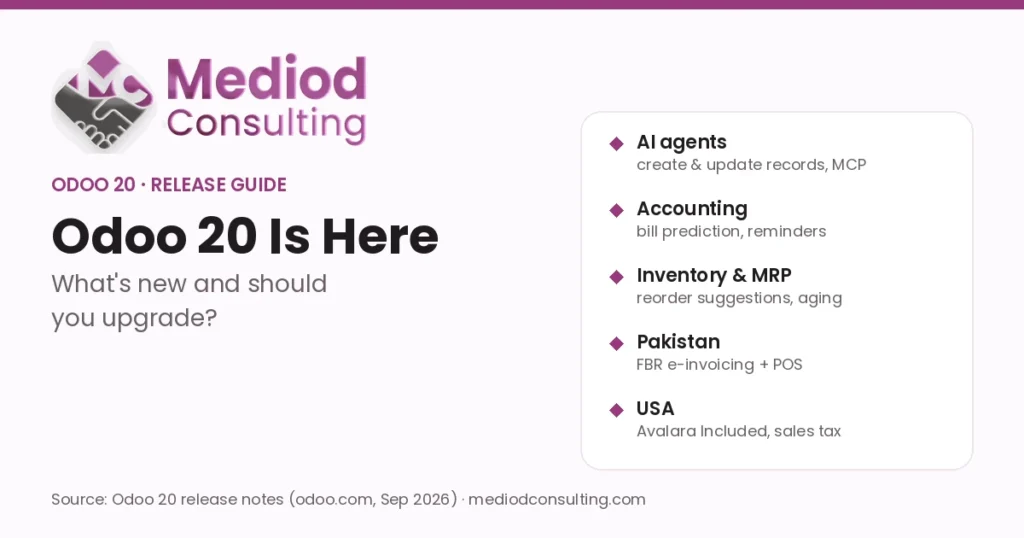
Odoo 20 was unveiled at Odoo Experience 2026 in Brussels, and Odoo has published the full Odoo 20 release notes. They run to hundreds of changes across every app. This guide picks out what matters for a typical business: the new AI agents, accounting and inventory improvements, country updates for Pakistan and the USA, and the changes you need to plan for before you upgrade.
Key takeaways
- AI agents can now create and update records, work from uploaded files, run inside automations and connect to other tools via MCP. All AI features now use prepaid IAP credits.
- Accounting: bill line prediction, automatic invoice reminders, stronger duplicate detection and stricter bank consistency.
- Pakistan: built-in FBR e-invoicing and real-time FBR reporting for Point of Sale.
- USA: a lower-cost “Avalara Included” AvaTax option, a redesigned sales tax report and more state payroll coverage.
- Plan upgrades carefully: access rights, chatter tracking and the icon set have changed under the hood, which affects custom modules.
Odoo 20 AI: agents that do the work
The biggest change is how far Odoo’s AI agents can go. According to the release notes, agents can now:
- Create and update records on request, including from an uploaded file of instructions such as a PDF.
- Run inside automations — agents can be triggered by automated and scheduled actions, and you can review how they handled each run.
- Answer questions about a file while you preview it, and accept dictated requests by voice.
- Generate images and buttons for websites and mailings.
- Connect to other tools through the Model Context Protocol (MCP).
Two practical points. First, all AI features now need IAP credits, bought separately from your user licences, so budget for usage. Second, Odoo now lists “Agentic AI” on the Custom plan card, next to Odoo Studio — at the same time as a 20–31% Custom plan price increase. Our Odoo AI guide covers practical use cases, and you can explore Odoo AI on odoo.com.
Accounting: less manual entry, fewer mistakes
- Bill line prediction: when you enter or import a bill, Odoo suggests the product, account, tax and analytic distribution from your bill history.
- Customer invoice reminders can be sent manually or automatically from the Accounting settings.
- Better duplicate detection with two warning levels — red for likely duplicates, yellow for ones to check.
- Bank consistency: every journal entry that touches a bank account must now come from a bank transaction.
- New reports: a bank reconciliation summary, and a Cumulative Translation Adjustment line for multi-currency groups.
- Renamed payment statuses: “In Process” becomes “Paid” and “Paid” becomes “Reconciled” — worth a short briefing for your finance team.
- Expenses: approved expenses now create draft bills that accountants review alongside vendor bills.
See our Odoo Accounting guide or try Odoo Accounting.
Inventory and manufacturing
- Suggested reordering levels: minimum and maximum stock are suggested from demand history, desired days of coverage and order frequency.
- Stock aging report and an improved view of inventory at a past date.
- Landed costs per product, and delivery values that update when a product’s cost changes afterwards.
- Intercompany flows: resupply one company from another and deliver from another company’s warehouse.
- Manufacturing: continuous production across work orders, splitting ongoing manufacturing orders, resetting orders to draft, and provisional vs. real MO cost.
- A redesigned manufacturing-order Kanban grouped by week, with component status and remaining time.
More in our Odoo MRP guide, or explore Odoo Inventory.
Sales, CRM and Point of Sale
- Sales: a dashboard on the quotations list, pricelist rules for specific periods or weekdays, payment-based and manager commissions, and editable margins on order lines.
- CRM: lead generation now uses the Dun & Bradstreet company database, plus new lead rotation rules for sales teams.
- Point of Sale: multiple currencies at checkout, service fees, “snoozing” unavailable products, several printers per POS, and a simplified inventory mode that works without the Inventory app.
- Offline mode: create and edit records while offline.
Retailers can explore Odoo Point of Sale; see also Odoo for retail businesses.
Odoo Studio
Studio gets a new report editor, drag-and-drop ordering of form buttons and tabs, Kanban stage editing from the form view, many-to-many fields in PDF reports and more readable technical names for new fields. Remember that installing Studio moves you to the Custom plan — see Odoo Studio vs custom development.
Country updates: Pakistan, USA and Germany
Pakistan
- FBR e-invoicing integration for registered businesses, in line with S.R.O. 1852(I)/2025.
- FBR integration for Point of Sale for real-time reporting of POS orders — mandatory for Tier-1 retailers.
- A restructured chart of accounts aligned with the Companies Act 2017, and taxes consolidated into sales tax, further tax and withholding tax.
- A “Business Identification Number” field that accepts NTN or CNIC, plus a separate consumer identification field.
- Payroll: payslips include end-of-year income tax adjustments.
Pakistani businesses that relied on custom FBR connectors should review them before upgrading. See our Odoo price increase in Pakistan post and Odoo services in Lahore.
United States
- “Avalara Included” — a new, more affordable AvaTax integration for small and mid-sized businesses in the USA and Canada.
- A redesigned US sales tax report with multi-jurisdiction breakdowns and state summaries.
- Payroll: New York City and Yonkers local taxes; Tennessee, Iowa, Georgia, Mississippi and New Jersey support; qualified overtime deduction rules.
US teams: see Odoo price increase in the USA and our Odoo services in the USA.
Germany
The Odoo 20 release notes list no Germany-specific localization changes. German companies still benefit from the general accounting improvements above; for DATEV and GoBD topics see our Odoo DATEV guide and Odoo services in Germany.
What to check before upgrading to Odoo 20
Several changes affect databases with custom modules or Studio customizations:
- Simplified access rights: record rules have been removed in favour of a domain on the access right itself. Custom security rules need to be reviewed.
- Chatter tracking: stored tracking values have been removed and tracking messages are generated on the fly. Custom reports built on tracking data need checking.
- Icons: Font Awesome has been replaced by Material Symbols, which can affect custom views and website themes.
- Push notifications no longer use Firebase.
- Process changes such as the renamed payment statuses and the removed “Employee Expenses” menu need user training.
Our advice: test the upgrade on a copy of your database first, check every custom module and integration, and train key users on the renamed flows before go-live. Odoo Online databases are upgraded on a schedule set by Odoo, while Odoo.sh and on-premise customers choose their timing. Read our Odoo upgrade guide, or let our Odoo migration team run a test upgrade for you.
Should you upgrade now?
- Starting a new implementation? Starting on Odoo 20 avoids an upgrade later — check that your localization and any apps you rely on are ready.
- On Odoo 19 with little customization? Plan the upgrade once you have tested it on a copy; the new AI and accounting features are worth it.
- On Odoo 17 or older, or heavily customized? Start planning now. Budget time for rewriting custom security rules and reviewing integrations.
Buying or renewing Odoo?
Start your subscription through Mediod’s Odoo partner link, then email info@mediodconsulting.com (before or after you purchase) and we apply a 22% discount to your Odoo subscription. Prefer to see it first? Use partner code M23052984318833 for a free 30-day Odoo demo database.
Want a second opinion on your plan, user mix or renewal quote? Book a free discovery call or request a quotation.
Disclosure: Mediod Consulting is an official Odoo Silver Partner. Links marked as partner links may earn us a commission at no extra cost to you.
Frequently Asked Questions
When was Odoo 20 released?
Odoo 20 was unveiled at Odoo Experience 2026 in Brussels (24–26 September 2026), and Odoo published the Odoo 20 release notes in September 2026.
What are the main new features in Odoo 20?
AI agents that can create and update records, work from files and run inside automations; MCP connectivity; bill line prediction and automatic invoice reminders in Accounting; suggested reordering levels and a stock aging report in Inventory; continuous production in Manufacturing; and multi-currency checkout in Point of Sale.
Are Odoo 20 AI features free?
No. According to the release notes, all AI features now need IAP credits, which are bought separately from user licences. Odoo also lists Agentic AI on the Custom plan.
Does Odoo 20 support FBR e-invoicing in Pakistan?
Yes. Odoo 20 adds an FBR e-invoicing integration for registered businesses (S.R.O. 1852(I)/2025) and an FBR integration for Point of Sale for real-time reporting, which is mandatory for Tier-1 retailers.
Will my custom modules work in Odoo 20?
Not automatically. Odoo 20 changes access rights, chatter tracking and the icon set, so custom modules and Studio customizations should be reviewed and tested on a copy of your database before you upgrade.
Source: Odoo 20 release notes (odoo.com, September 2026). Feature availability can differ by edition, hosting type and country.