Every Odoo project starts with the same question from a prospective client: “So what does implementation actually involve?” It’s a fair question, and the honest answer is longer than most vendors want to give — because implementation is not the same thing as installing software.
What Odoo implementation actually means
Odoo implementation is the process of configuring, customizing, and deploying Odoo’s applications so they match how a specific business actually operates — not how a generic demo assumes it operates. That distinction matters more than it sounds. A retailer, a manufacturer, and a professional services firm can all run on Odoo, but the modules they need, the way those modules connect, and the data that has to move between them look completely different.
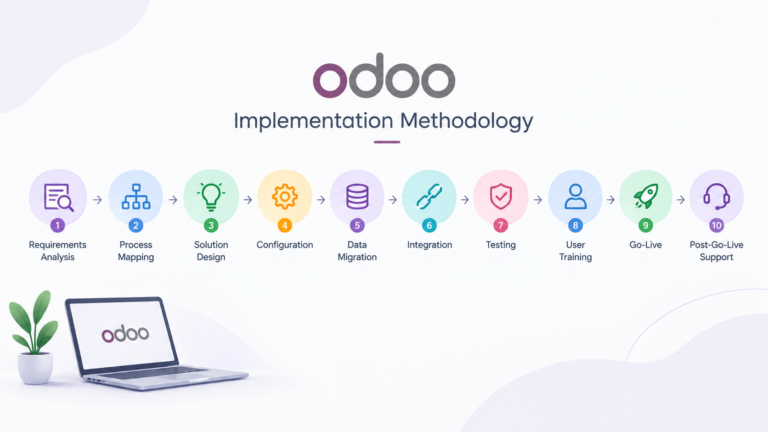
In practice, we break an implementation into a handful of connected phases: business requirements analysis, business process mapping, solution design, configuration, data migration, integration, testing, user training, go-live, and post-go-live support. None of these are optional if the goal is a system people actually use after launch — skipping process mapping to save a week almost always costs more than a week once the business discovers, mid-implementation, that the configured workflow doesn’t match how the sales team really quotes a job.
Implementation vs. customization — a distinction worth making early
We get asked to “customize Odoo” more often than we get asked to “implement Odoo,” and the two get used interchangeably even though they’re different scopes of work. Implementation is the full project: understanding requirements, configuring the applications, migrating data, connecting systems, training users, and supporting go-live. Customization is a subset — changing how Odoo behaves beyond what standard configuration allows, usually through Odoo Studio, custom fields, automated actions, or custom development.
Our own rule of thumb: introduce customization only where a genuine business requirement can’t reasonably be met through standard configuration. Every custom field or automated action is something that has to be maintained, tested against, and re-verified on the next Odoo upgrade. A clean implementation that leans on Odoo’s standard functionality wherever possible is almost always cheaper to own over three years than a heavily customized one, even if the initial build looks similar.
What a typical implementation connects
The reason businesses move to Odoo in the first place is usually the same: too many disconnected tools, too much manual re-entry between them. A well-implemented Odoo environment replaces that with a single data flow. For a straightforward trading business, that often looks like:
Sales → Inventory → Delivery → Invoicing → Accounting
For a manufacturing business, the same idea extends further:
Sales → Procurement → Inventory → Manufacturing → Quality → Delivery → Accounting
We usually recommend starting with the applications that carry the core transaction flow — Sales, Inventory, Accounting — and adding Purchase, Manufacturing, or Ecommerce once that foundation is stable. Quality, Maintenance, and PLM get introduced when the operational requirements actually justify them, not by default just because the module exists.
Why “just turn on the modules” doesn’t work
Odoo’s own demo makes every application look ready to use out of the box, and for a very simple business, close to that is possible. For most real businesses, it isn’t — because the demo doesn’t know your chart of accounts, your approval workflow, your existing customer and vendor data, or the three spreadsheets your team currently uses to track something Odoo doesn’t do by default.
That gap is what implementation work actually closes. It’s requirements analysis so the configuration matches real workflows, data migration so historical records survive the move intact, integration so Odoo talks to the ecommerce platform or accounting tool you’re keeping, and testing so the first real invoice isn’t also the first time anyone finds the gap.
Frequently asked questions
How is Odoo implementation different from just installing Odoo?
Installing Odoo takes minutes. Implementation is everything that makes the installed system usable for your specific business — requirements analysis, configuration, data migration, integrations, testing, training, and go-live support.
Do I need customization for a standard implementation?
Not necessarily. Many implementations run entirely on standard configuration. Customization is introduced only when a real business requirement can’t be met through Odoo’s built-in options.
Which Odoo applications should I start with?
Most implementations start with the core transaction flow — Sales, Inventory, and Accounting — then add Purchase, Manufacturing, or Ecommerce as the business is ready for them.
If you’re weighing what an implementation would actually involve for your business, our Odoo Implementation Services page covers our process end to end, or you can talk to us directly about your specific setup.