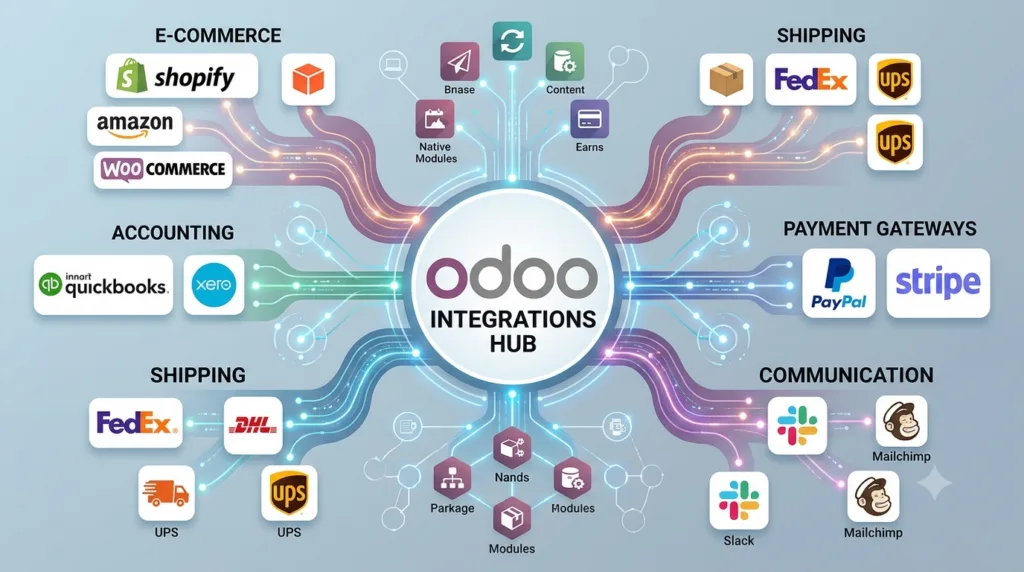
Connect Odoo with the systems your business already uses through reliable, scalable, and secure Odoo integration services.
Odoo can manage a wide range of business processes, including CRM, sales, purchasing, inventory, manufacturing, accounting, ecommerce, and project management. However, businesses often rely on other platforms for ecommerce, payments, accounting, logistics, communication, analytics, or specialized operations.
Instead of manually transferring information between systems, Odoo integrations can connect these platforms and automate the flow of data.
Mediod Consulting helps businesses integrate Odoo with ecommerce platforms, accounting software, CRM systems, payment providers, logistics services, communication tools, productivity platforms, and custom applications.
What Are Odoo Integrations?
An Odoo integration connects Odoo with another software platform so that information can be exchanged automatically between systems.
For example:
Shopify → Odoo → Inventory → Sales → Accounting
Or:
Odoo → Shipping Provider → Tracking Information → Customer
Instead of employees entering the same information into multiple applications, an integration can synchronize the required data automatically.
Depending on the project, integrations can use APIs, webhooks, scheduled synchronization, connectors, or custom Odoo modules.
Why Integrate Odoo With Other Systems?
Most businesses already have software that they need to keep using.
Replacing every existing system is not always practical or necessary.
Odoo integration can help businesses:
- Reduce manual data entry
- Eliminate duplicate records
- Synchronize business information
- Automate repetitive processes
- Improve data accuracy
- Connect ecommerce with inventory
- Connect sales with accounting
- Automate shipping workflows
- Improve customer service
- Create centralized reporting
- Reduce operational complexity
The objective is not simply to connect two APIs.
A successful integration should improve the overall business workflow.
Odoo Ecommerce Integrations
Ecommerce is one of the most common Odoo integration requirements.
Businesses may already operate online stores using platforms such as:
- Shopify
- WooCommerce
- eBay
- Other ecommerce platforms with APIs
An integration can connect the ecommerce platform with Odoo for processes such as:
- Products
- Product variants
- Customers
- Orders
- Inventory
- Prices
- Taxes
- Shipments
- Payments
A typical workflow could be:
Online Store → Order → Odoo Sales → Inventory → Delivery → Invoice
This allows Odoo to become the central operational system while the ecommerce platform continues to provide the customer-facing storefront.
Odoo Shopify Integration
Businesses using Shopify can connect their online store with Odoo to synchronize relevant ecommerce and ERP data.
Depending on the project requirements, a Shopify-Odoo integration may synchronize:
- Products
- Product variants
- Customers
- Orders
- Inventory
- Prices
- Fulfillment information
The exact synchronization should be defined before development because not every business needs every data type to flow in both directions.
Odoo WooCommerce Integration
WooCommerce businesses can also connect their online stores with Odoo.
An integration can help synchronize ecommerce orders with Odoo Sales and connect order processing with:
Inventory → Delivery → Accounting
This can reduce the need for employees to manually recreate online orders inside Odoo.
Odoo Marketplace Integrations
Businesses selling through marketplaces can also benefit from Odoo integrations.
Depending on the platform and available APIs, integrations can connect:
- Products
- Orders
- Customers
- Inventory
- Shipping
- Pricing
The integration architecture should be designed around the marketplace’s API limitations and the company’s operational requirements.
Odoo Accounting Integrations
Accounting is another major integration area.
Businesses may already use accounting systems such as:
- DATEV
- QuickBooks
- sevDesk
- Other accounting platforms
An Odoo accounting integration can synchronize selected financial information between systems.
Possible integration workflows include:
Odoo Invoices → Accounting Platform
Odoo Payments → Accounting Platform
Odoo Customers → Accounting Platform
The exact workflow depends on which system is intended to be the source of truth.
Odoo DATEV Integration
For businesses operating in Germany, DATEV can be an important part of the accounting workflow.
Odoo’s German localization includes DATEV export functionality, while additional integration requirements may require a specific workflow or custom development.
The implementation should take German accounting requirements, data structure, chart of accounts, taxes, and the company’s Steuerberater workflow into account.
Odoo sevDesk Integration
Businesses using sevDesk may choose either to integrate sevDesk with Odoo or migrate their accounting processes to Odoo.
A sevDesk-Odoo integration can be designed around requirements such as:
- Customers
- Invoices
- Credit notes
- Payments
- Taxes
- Accounting data
The appropriate approach depends on whether Odoo or sevDesk will remain the primary system for each type of information.
Odoo CRM Integrations
Businesses may use specialized CRM or sales tools alongside Odoo.
An Odoo CRM integration can connect customer and sales information between systems.
Potential use cases include:
- Lead synchronization
- Contact synchronization
- Opportunity synchronization
- Customer updates
- Sales activity synchronization
The objective is to prevent sales teams from maintaining duplicate customer records across multiple systems.
Odoo API Integration
Odoo provides API capabilities that allow external applications to communicate with the ERP.
API integrations can be used to:
- Read Odoo data
- Create records
- Update records
- Synchronize information
- Trigger business processes
- Connect external applications
An API-based integration is particularly useful when a business uses custom software or a platform that does not have an existing Odoo connector.
Custom Odoo API Integration
Not every business has the same requirements.
A standard connector may synchronize basic orders and products but fail to support a company’s specific workflow.
A custom Odoo API integration can be developed when the project requires:
- Custom fields
- Custom business logic
- Complex data mapping
- Advanced synchronization
- Multiple external systems
- Specialized workflows
- Custom error handling
Odoo Payment Integrations
Payment providers can be connected to Odoo to support online and business payment workflows.
Depending on the payment provider and implementation, an integration can help manage:
- Payment transactions
- Payment status
- Order confirmation
- Refunds
- Payment references
- Reconciliation workflows
The objective is to reduce manual payment processing and keep order and payment information synchronized.
Odoo Logistics Integrations
Shipping and logistics integrations can connect Odoo with carriers and logistics providers.
Mediod Consulting has experience with integrations involving logistics providers such as:
- DHL
- FedEx
- UPS
- Other shipping providers
A logistics integration can automate processes such as:
Odoo Delivery Order → Shipping Provider → Shipping Label → Tracking Number → Odoo
The tracking information can then be made available to internal users and, where supported, customers.
Odoo VoIP Integrations
Sales and customer service teams often rely heavily on telephone communication.
Odoo can be connected with VoIP systems to help businesses manage communication workflows from their ERP environment.
Potential functionality includes:
- Calling customers from Odoo
- Call logging
- Customer identification
- Call history
- Sales activity tracking
This can help sales and support teams maintain customer communication history alongside other business information.
Odoo Google Workspace and Microsoft 365 Integrations
Businesses commonly use productivity platforms such as Google Workspace and Microsoft 365.
Integration opportunities can include:
- Calendar synchronization
- Email workflows
- Contact synchronization
- Document workflows
- Productivity automation
The specific integration depends on the business process and the services that need to communicate with Odoo.
Odoo Business Intelligence and Analytics Integrations
Businesses may also need to send Odoo information to analytics and reporting platforms.
An integration can move selected data from Odoo into a reporting environment for:
- Sales analysis
- Financial reporting
- Inventory analysis
- Customer analytics
- Management dashboards
- Business intelligence
This is particularly useful when management requires reporting that goes beyond standard Odoo dashboards.
Odoo Integration With Custom Applications
Some companies use internally developed applications or industry-specific software.
If the application provides an API, Odoo can potentially be connected to it.
Examples include:
- Custom portals
- Warehouse systems
- Manufacturing software
- Customer portals
- Industry-specific applications
- Internal business applications
A custom integration can be designed around the company’s existing architecture rather than forcing the business to replace software that is already working.
How Our Odoo Integration Process Works
A successful integration requires more than connecting two systems.
At Mediod Consulting, the integration process can be structured around several stages.
1. Understand the Business Process
We first identify what the business is trying to achieve.
For example:
Online Order → Odoo → Warehouse → Shipment → Accounting
The process is more important than the API itself.
2. Identify the Systems
We identify all platforms involved in the workflow.
This may include:
- Odoo
- Ecommerce
- Accounting
- Payment
- Logistics
- CRM
- Custom applications
3. Define the Source of Truth
Every important data type should have a clear owner.
For example:
Product Master → Odoo
Online Order → Shopify
Accounting Record → Accounting System
Without clear ownership, integrations can create duplicate or conflicting data.
4. Define Data Mapping
Fields and records need to be mapped between systems.
For example:
Shopify Customer → Odoo Customer
Shopify Product → Odoo Product
Shopify Order → Odoo Sales Order
Shipping Tracking → Odoo Delivery
5. Select the Integration Method
Depending on the systems involved, we may use:
- APIs
- Webhooks
- Scheduled synchronization
- Existing connectors
- Custom modules
- Middleware
6. Develop or Configure the Integration
The integration is then configured or developed according to the approved workflow.
7. Test the Integration
Testing should cover:
- New records
- Updated records
- Deleted or archived records where relevant
- Duplicate prevention
- Failed transactions
- API errors
- Authentication
- Data mapping
- Large data volumes
8. Go Live
After successful testing, the integration is deployed to production.
9. Monitor and Support
Post-go-live monitoring helps identify synchronization problems, API failures, authentication issues, and unexpected data conditions.
Standard Odoo Connector vs Custom Integration
One of the first decisions in an integration project is whether to use an existing connector or develop a custom solution.
Use a Standard Connector When
A standard connector may be appropriate when:
- Requirements are straightforward
- The platform is already supported
- Standard synchronization meets the business requirements
- Custom workflows are limited
Consider Custom Development When
Custom integration may be appropriate when:
- The business has unique workflows
- Standard connectors don’t support required data
- Complex data mapping is required
- Multiple systems need to communicate
- Advanced automation is required
- Existing connectors are unreliable or incomplete
The goal should always be to use standard functionality where possible and introduce custom development only when there is a clear business requirement.
Common Odoo Integration Challenges
Integration projects can fail when technical and business requirements are not clearly defined.
Common challenges include:
Duplicate Records
The same customer or product may be created multiple times when synchronization rules are poorly designed.
Incorrect Data Mapping
Different systems may use different fields, tax structures, product identifiers, or accounting codes.
API Limitations
External platforms may impose rate limits or restrictions on available data.
Failed Synchronization
Network problems, authentication failures, API changes, or invalid data can cause synchronization failures.
Unclear Data Ownership
When two systems both attempt to control the same information, conflicts can occur.
Poor Error Handling
A good integration should identify failed transactions and provide a way to investigate and resolve them.
Benefits of Odoo Integration Services
A well-designed Odoo integration can provide:
Less Manual Work
Employees spend less time copying information between systems.
Better Data Accuracy
Automated synchronization can reduce human data-entry errors.
Faster Order Processing
Orders can move automatically from ecommerce platforms into Odoo.
Improved Inventory Visibility
Inventory information can be synchronized between Odoo and connected sales channels.
Better Financial Workflows
Invoices and payments can be transferred between operational and accounting systems.
Centralized Business Information
Odoo can become the central operational platform while still communicating with specialized applications.
Better Customer Experience
Automated order, delivery, payment, and communication workflows can improve customer service.
Why Choose Mediod Consulting for Odoo Integrations?
An integration should be designed around the business process, not just the technical API.
Mediod Consulting works with businesses that need to connect Odoo with ecommerce platforms, accounting systems, CRM applications, payment providers, logistics services, productivity tools, and custom software.
Our Odoo integration approach focuses on:
- Business process analysis
- Data mapping
- API integration
- Custom Odoo development
- Existing connector evaluation
- Integration testing
- Error handling
- Data synchronization
- Post-go-live support
We can help determine whether your requirement can be handled through standard Odoo functionality, an existing connector, or a custom integration.
Not sure which integration approach fits your systems? Talk to Mediod Consulting’s integration team — we’ll assess your requirements and recommend standard connectors vs. custom development before you spend a dollar on development.
Frequently Asked Questions About Odoo Integrations
What is Odoo integration?
Odoo integration connects Odoo with another software system so that data and business processes can be synchronized between the platforms.
Can Odoo integrate with Shopify?
Yes. Odoo can be integrated with Shopify to synchronize selected ecommerce data such as products, customers, orders, inventory, and fulfillment information.
Can Odoo integrate with WooCommerce?
Yes. WooCommerce can be connected with Odoo to synchronize ecommerce and ERP data based on the business requirements.
Can Odoo integrate with accounting software?
Yes. Odoo can integrate with accounting platforms and financial systems depending on the available APIs, connectors, and required workflow.
Can Odoo integrate with DATEV?
Odoo’s German localization supports DATEV export functionality. Additional requirements may require a specific integration or customized workflow.
Can Odoo integrate with sevDesk?
Yes. Odoo and sevDesk can be connected when the required data and workflows are supported by the integration architecture.
Can Odoo integrate with payment providers?
Yes. Payment providers can be integrated with Odoo for online payment and transaction workflows.
Can Odoo integrate with shipping companies?
Yes. Odoo can be integrated with shipping and logistics providers to automate delivery and tracking workflows.
Do I need a custom Odoo integration?
Not necessarily. The first step should be to determine whether Odoo’s standard functionality or an existing connector meets the requirement. Custom development should be considered when the business requires functionality that is not available through standard solutions.
How much does Odoo integration cost?
The cost depends on the systems involved, number of records, synchronization requirements, API complexity, data mapping, custom development, and error-handling requirements. A simple integration can be significantly less complex than a multi-system enterprise integration.
How long does an Odoo integration take?
The timeline depends on the complexity of the systems, number of workflows, amount of data, API limitations, customization requirements, and testing scope.
Connect Your Business Systems With Odoo
Whether you need to connect Shopify, WooCommerce, accounting software, CRM, payment providers, logistics platforms, or a custom application, the right integration can eliminate manual work and create a more connected business workflow.
Mediod Consulting can help you analyze your integration requirements, select the right approach, develop custom integrations where necessary, and connect your business systems with Odoo.
Get a free integration consultation, or start a free Odoo trial and email info@mediodconsulting.com for a 22% discount on your subscription, before or after you buy.