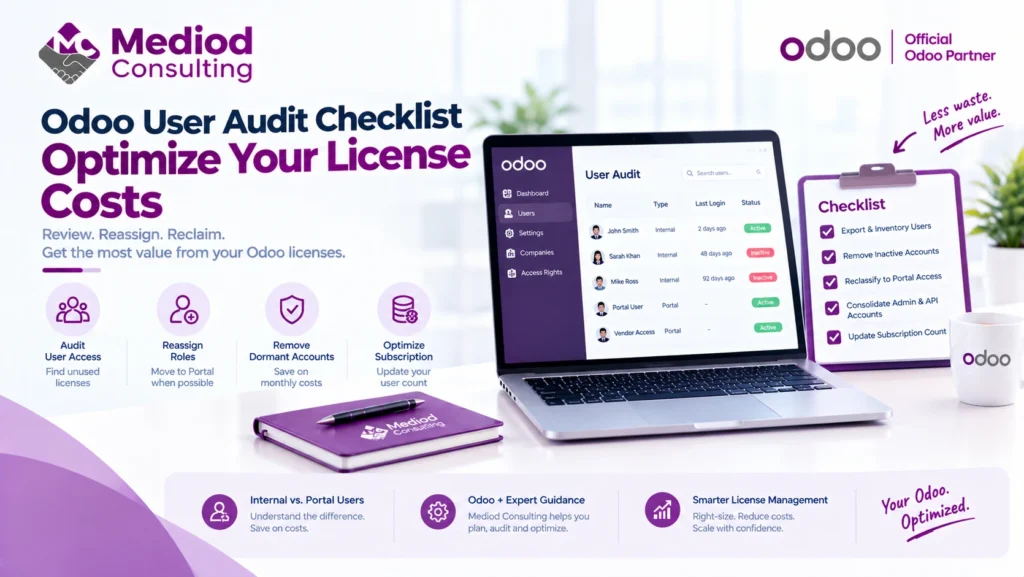
Every active internal user in Odoo directly impacts your monthly software bill. Conducting a periodic user audit allows you to reclaim unused licenses, reassign roles to free Portal access, and eliminate license bloat prior to your annual subscription renewal.
Use this operational checklist to perform a full backend user audit across your organization.
1. Export & Inventory All Active Users:Prerequisite: Settings Access (Access Rights Administrator).
Navigate to Settings > Users & Companies > Users in your Odoo database. Filter by Internal Users and export the list to CSV/Excel with the following fields:
Name,Login / EmailAccess Rights/GroupsLast Connection Date(latest_execution_dateor connection logs)Created Ondate
2. Identify & Archive Inactive or Dormant Accounts:Target: Zero login activity in past 60–90 days.
Filter your exported sheet by Last Connection Date:
- No activity > 90 days: Contact line managers to confirm offboarding status. If departed or no longer needing backend access, Archive the user immediately.
- Generic / Shared Accounts: Identify accounts like
sales@company.comorwarehouse1. Convert shared credentials into distinct named users or move shared operations to public/portal workflows to prevent compliance issues. - Note: Archiving a user preserves all historical records, chatter comments, and document audit trails while freeing up a paid backend slot.
3. Reclassify Operational Roles to Free Portal Access:Target: Staff needing read-only or self-service access.
Odoo Portal Users are 100% free and do not count toward your paid internal license count. Audit current internal users against these operational rules:
- Contractors & External Vendors: Should be converted to Portal Users with access to Purchase Orders, Invoices, and Task Tracking.
- Field Staff & Light Requesters: Employees who only submit expense reports, request time off, or check project status can often be shifted to Portal or self-service interfaces rather than full backend internal accounts.
- Customers / B2B Clients: Ensure client contacts are strictly set to Portal / Contact access and not accidentally created as internal users.
4. Consolidate Administrator & API Service Accounts:Target: System integration & service endpoints.
- Review third-party API integrations (e.g., e-commerce connectors, shipping integrations, custom external apps).
- If an integration requires an internal user login, evaluate whether API keys can be grouped under a single dedicated system integration account rather than maintaining separate paid licenses for each secondary connector.
5. Adjust Odoo Subscription User Count:Final Action: Lock in savings with Odoo / Partner.
Archiving users in your Odoo database stops internal access, but your billing user count must be adjusted separately on your subscription contract:
- Log in to your account portal at odoo.com/my/subscription.
- Update your active user count to match your newly audited total prior to your upcoming contract renewal window.
- If purchasing through Mediod Consulting, send your revised active user count to your dedicated account consultant to update your subscription agreement.
Quick Reference Matrix: Internal vs. Portal User
| User Type | Billing Impact | Key Capabilities | Best For |
| Internal User | Paid | Full access to backend menus, CRUD operations on core models, Studio customizations. | Daily operational staff, managers, accountants, sales reps. |
| Portal User | Free ($0) | Restricted frontend portal view, view/pay invoices, submit tickets, track project tasks. | Customers, suppliers, contractors, external stakeholders. |
| Public User | Free ($0) | Unauthenticated browsing on website/e-commerce. | Website visitors. |
As an official Odoo Silver Partner, Mediod Consulting acts as an intermediary and strategic advisor between businesses and Odoo S.A. Rather than treating annual contract renewals as a routine administrative task, Mediod helps organizations audit usage, right-size infrastructure, and structure long-term licensing agreements to protect against unnecessary cost creep.
Mediod Consulting assists companies through four key phases of the renewal cycle:
1. Pre-Renewal Usage & License Auditing
Before entering contract discussions, Mediod conducts an internal system audit to identify hidden cost drivers:
- Active User Right-Sizing: Uncovering inactive backend accounts or reclassifying light operational roles (such as suppliers, field staff, or client requesters) to free Portal User access, reducing total paid user counts.
- Standard vs. Custom Plan Alignment: Evaluating whether your organization truly requires Odoo’s Custom Plan (required for Studio, multi-company setups, external APIs, or custom hosting) or if your database can be streamlined onto the lower-cost Standard Plan.
2. Strategic Contract Structuring
Mediod helps structure contract terms to minimize rate fluctuations:
- Multi-Year Rate Locks: Assisting businesses in negotiating multi-year commitments (e.g., 3-to-5-year contracts) prior to major upgrade cycles or regional price adjustments. This locks in baseline user rates and protects against annual renewal increases.
- Co-Terming & Add-On Alignments: Structuring user expansion seats and secondary module licenses under a unified, co-termed renewal date so mid-year additions don’t trigger unexpected pro-rated charges or multi-invoice confusion.
3. Partner-Assisted Advocacy & Co-Negotiation
As an accredited partner, Mediod works directly alongside Odoo’s official account managers:
- Tiered & Volume Discounting: Leveraging partner ecosystem channels to advocate for volume-based pricing or retaining grandfathered promotional rates for growing teams.
- Hosting & Infrastructure Optimization: Helping evaluate hosting costs (Odoo Online vs. Odoo.sh vs. self-hosted cloud on AWS/DigitalOcean) to ensure you aren’t overpaying for server resources or staging environments.
4. Hybrid Architecture Advisory (Community vs. Enterprise)
For companies facing steep enterprise license scaling costs, Mediod provides architectural options:
- Selective Hybrid Deployment: Advising on whether certain non-critical modules can be offloaded to high-quality, open-source Odoo Community Association (OCA) tools or third-party marketplace apps, keeping your core Enterprise user footprint lean and cost-effective.