Small businesses evaluating CRM options often assume enterprise-grade CRM means enterprise-grade complexity and cost. Odoo’s CRM is built into the same free Community edition as the rest of the platform, making it a genuinely accessible option rather than a scaled-down version of something built for much larger teams.
What a small business actually needs from CRM
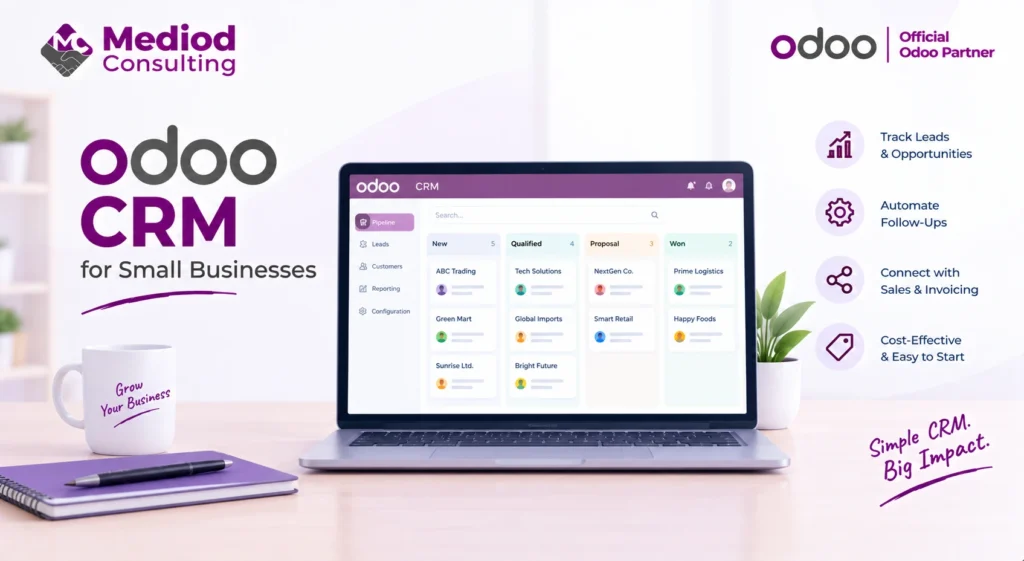
Most small businesses need the fundamentals done well: tracking leads and opportunities through a clear pipeline, not losing track of follow-ups, and having visibility into what’s actually in progress without a complicated setup process. Odoo CRM’s Kanban pipeline view covers this directly, without requiring extensive configuration before it’s usable.
Getting started without over-configuring
We generally recommend a small business start with the default pipeline stages and basic lead capture, using the system for a few weeks before customizing anything — it’s common to think you need custom fields or complex automation on day one, only to find the standard setup covers most real needs once the team is actually using it.
Connecting CRM to the rest of a small operation
The real advantage for a small business isn’t CRM in isolation — it’s that a won opportunity in Odoo CRM can become a quotation, then a sales order, then an invoice, all in the same system without re-entering data. For a small team without dedicated admin support, this connected flow removes a meaningful amount of manual work compared to a standalone CRM feeding a separate invoicing tool.
Automating follow-ups without extra headcount
Small teams often don’t have someone dedicated to chasing every follow-up manually — automated actions (see our Lead Automation guide) can handle reminders for stalled opportunities or overdue follow-ups, helping a small team not lose leads simply because everyone’s busy.
Cost considerations for a small business
CRM functionality is available in the free Community edition, meaning a small business can access genuine CRM capability without a per-user subscription cost that scales painfully as the team grows — a real consideration for small businesses watching every recurring expense closely.
Frequently Asked Questions
Is Odoo CRM too complex for a very small sales team?
Not if you start with the default configuration — a small team using basic pipeline tracking gets meaningful value without needing to configure advanced features they don’t yet need.
Can a small business use Odoo CRM without implementing the rest of Odoo?
Yes, CRM can be used standalone, though the connected benefits (CRM to Sales to Accounting) only materialize once those other apps are also in use.
Does Odoo CRM require ongoing IT support for a small business?
Day-to-day use doesn’t require technical support, though initial setup and any customization benefit from some Odoo familiarity, even for a small, straightforward implementation.
Get CRM Set Up Right for a Small Team
Small businesses need CRM that’s genuinely usable without a big setup burden or ongoing cost. Talk to Mediod Consulting about setting up Odoo CRM for your small business.