Every ERP conversation eventually turns to automation — and for good reason. The businesses pulling ahead in 2026 aren’t necessarily working harder; they’ve simply removed the manual, repetitive work that used to eat up their teams’ time. Here’s what ERP automation actually means, the trends shaping it right now, and how to start capturing the benefits.
What Is ERP Automation?
ERP automation means using your enterprise resource planning system to trigger actions automatically — updating records, generating documents, sending notifications, moving data between systems — without a person manually doing each step. It’s the difference between a system that stores your business data and one that actively works for you.
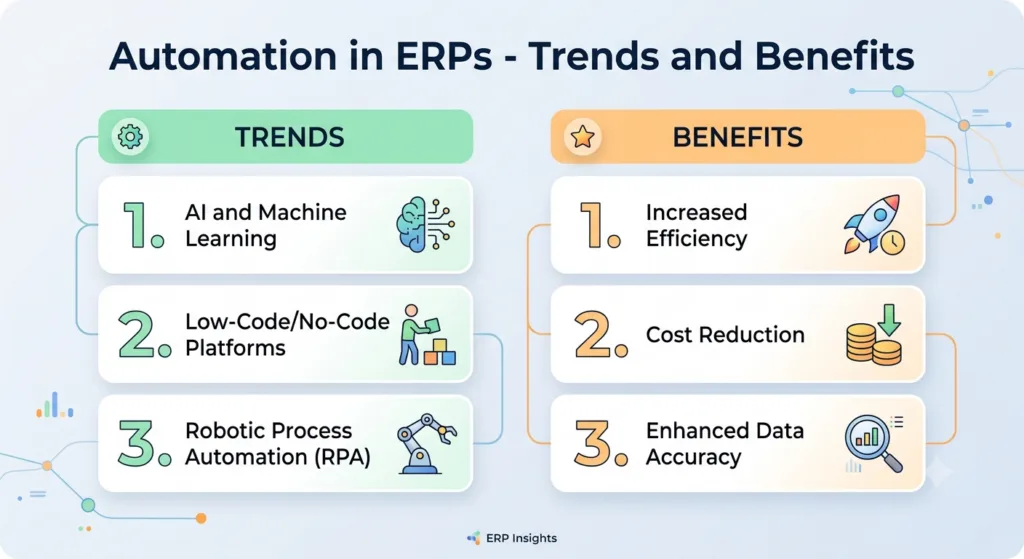
Key Benefits of Automating Business Processes
- Fewer errors — automated processes don’t mistype data or forget a step.
- Faster response times — approvals, alerts, and follow-ups happen instantly instead of whenever someone gets to them.
- Lower operating costs — less manual labor spent on repetitive administrative work.
- Better data quality — real-time, accurate information flowing between departments instead of stale spreadsheets.
- Scalability — automated workflows handle 10x the volume without needing 10x the headcount.
Trends Shaping ERP Automation in 2026
A few shifts are worth watching if you’re planning your automation roadmap:
- AI-assisted automation — ERP systems increasingly use AI to suggest or even configure automated workflows, not just execute pre-built ones.
- No-code/low-code tools — platforms like Odoo Studio put automation-building directly in the hands of operations teams, not just developers.
- Cross-system automation — automating workflows that span the ERP and external tools (payment gateways, shipping carriers, marketing platforms) rather than staying siloed inside one system.
- Real-time triggers over batch processing — actions firing the moment a condition is met, instead of waiting for a nightly batch job.
How Odoo Powers ERP Automation
Odoo’s automated actions feature lets you configure trigger-based automation — on record creation, update, deletion, or a time condition — without writing code for most use cases. Combined with Odoo Studio’s broader no-code toolkit, and deeper custom development when a workflow genuinely needs it, Odoo gives growing businesses the same caliber of automation capability that used to require enterprise-scale ERP budgets. See our full guide to Odoo automated actions for a step-by-step walkthrough.
Getting Started with ERP Automation
The businesses that get the most value from automation don’t try to automate everything at once — they start with the highest-friction manual processes (follow-ups that get missed, data entry that eats hours every week, approvals that stall in someone’s inbox) and expand from there. An experienced implementation partner can help identify where automation will actually move the needle for your specific operations.
Try Odoo free and see its automation tools firsthand →
Frequently Asked Questions
Is ERP automation only useful for large companies?
No — smaller teams often benefit the most, since automation replaces work that would otherwise require hiring additional administrative staff as the business grows.
Do I need developers to set up ERP automation?
Not necessarily. Tools like Odoo Studio let non-developers configure most automated workflows directly. More complex, cross-system automations typically benefit from a development partner.
How long does it take to implement ERP automation?
Simple automated actions can be configured in minutes. A broader automation strategy across multiple departments is usually rolled out incrementally alongside your Odoo implementation.
Can Mediod Consulting audit our current processes for automation opportunities?
Yes — contact our team for a process review focused on where automation will have the biggest impact.
Get Started with Mediod Consulting
Ready to stop doing manually what your ERP could be doing automatically? Talk to Mediod Consulting about building an automation strategy around Odoo, or email us for a free consultation.