Implementing Odoo in Germany often involves more than configuring an ERP system. Businesses may already rely on accounting platforms such as sevDesk and need to connect their existing financial workflows with Odoo’s sales, inventory, CRM, purchasing, manufacturing, and reporting capabilities.
A successful Odoo implementation in Germany therefore needs to consider business processes, German accounting requirements, data migration, integrations, automation, and the relationship between the ERP system and the company’s tax or accounting workflows.
At Mediod Consulting, we recently helped a client migrate from sevDesk to Odoo and developed a custom sevDesk connector to support synchronization between the two platforms. The project included data cleansing, account mapping, historical data migration, invoice and payment synchronization, and financial reconciliation.
This article explains the challenges involved and what businesses should consider when implementing Odoo with sevDesk.
Why Businesses Move From sevDesk to Odoo
sevDesk can be useful for accounting and financial administration, particularly for businesses operating in Germany and other German-speaking markets.
As a company grows, however, it may require broader ERP functionality covering areas such as:
CRM
Sales
Purchasing
Inventory
Manufacturing
Project management
Ecommerce
Accounting
Reporting
Business automation
Instead of managing these processes across several disconnected systems, Odoo can bring them together within a single ERP platform.
The challenge is that companies already have years of financial and customer data in their existing systems.
A migration to Odoo therefore needs to be carefully planned.
Odoo Implementation in Germany: What Makes It Different?
An Odoo implementation in Germany should take local accounting and tax requirements into consideration from the beginning.
Odoo’s German fiscal localization supports both SKR03 and SKR04. Odoo’s German localization also provides Germany-specific accounting reports and DATEV export functionality.
Depending on the company’s requirements, an implementation may involve:
German fiscal localization
SKR03 or SKR04
VAT configuration
Fiscal positions
DATEV workflows
GoBD considerations
Customer and vendor account mapping
Historical accounting data
E-invoicing requirements
Integration with existing accounting systems
These requirements should be discussed with the company’s Steuerberater or accounting professional before the production system goes live.
Odoo and sevDesk Integration
For businesses that want Odoo to manage their operational processes while retaining sevDesk as part of their accounting workflow, an Odoo sevDesk integration can connect the two platforms.
A typical workflow could look like:
Odoo Sales → Invoice → Integration → sevDesk → Accounting
The exact workflow depends on which system is responsible for each process.
For example:
Odoo can manage customers and sales.
Odoo can manage products and inventory.
Odoo can generate invoices.
The integration can transfer selected financial information to sevDesk.
sevDesk can remain part of the accounting workflow.
The most important step is defining the source of truth for each data type before developing or configuring the integration.
Our sevDesk to Odoo Migration Project
For one of our projects, the client was based in Austria and was using sevDesk before moving toward Odoo.
The business needed the broader ERP capabilities of Odoo while ensuring that existing financial information could be transferred accurately.
Mediod Consulting developed a custom connector and migration process for the project.
The solution addressed:
Invoice synchronization
Credit note synchronization
Payment synchronization
Customer and vendor mapping
Tax mapping
Historical data migration
Accounting mapping
Data reconciliation
This type of project demonstrates why an ERP migration should be treated as both a data migration project and a business-process transformation.
The Main Challenge: Connecting ERP and Accounting
The client wanted to avoid maintaining the same information manually in two systems.
Without an appropriate integration or migration strategy, employees can end up:
Entering invoices twice
Maintaining duplicate customer records
Correcting mismatched data
Manually transferring accounting information
Reconciling records between systems
These activities increase administrative work and create opportunities for errors.
The objective was therefore to create a more reliable connection between Odoo and sevDesk.
Building a Custom Odoo sevDesk Connector
Generic integrations do not always cover the specific requirements of an ERP implementation.
A business may have:
Custom customer structures
Specific tax configurations
Different account mappings
Historical records
Custom workflows
Multiple companies
Special invoice requirements
For this project, Mediod Consulting developed a custom Odoo connector designed around the client’s requirements.
The integration addressed several important areas.
Invoice Synchronization
Invoices generated through Odoo could be transferred to the accounting workflow instead of requiring employees to manually recreate them.
Credit Notes
Credit notes also needed to be handled correctly so that financial records remained consistent.
Payment Synchronization
Payment information was included in the synchronization process to reduce manual reconciliation.
Customer and Vendor Mapping
Customer and vendor records needed to remain aligned between the systems.
This required careful mapping to prevent duplicate or incorrectly matched records.
Tax Mapping
Tax configuration was an important part of the integration.
The connector needed to ensure that the relevant tax information was mapped correctly between systems rather than simply copying values without considering the accounting structure.
Data Cleansing Before Odoo Migration
One of the most important parts of an ERP migration is often overlooked: data cleansing.
Before migrating information from sevDesk to Odoo, the source data should be reviewed for:
Duplicate contacts
Incorrect addresses
Missing information
Inconsistent tax information
Incorrect account mappings
Invalid references
Formatting problems
Duplicate transactions
Migrating poor-quality data into a new ERP simply transfers the existing problems into the new system.
For this project, data was reviewed and cleaned before migration.
Mapping sevDesk Data to Odoo
Data structures in different ERP and accounting systems are rarely identical.
A migration therefore requires a mapping layer.
For example:
sevDesk customer → Odoo customer
sevDesk vendor → Odoo vendor
sevDesk account → Odoo account
sevDesk tax → Odoo tax
sevDesk invoice → Odoo invoice
The mapping must also consider relationships between records.
A customer invoice, for example, should remain connected to the correct customer, tax configuration, accounting account, and related financial information.
Historical Data Migration
Historical data can be one of the most difficult parts of an ERP implementation.
Businesses may want to migrate:
Customers
Vendors
Invoices
Credit notes
Payments
Accounting entries
Documents
Historical transactions
The migration strategy should be decided before implementation begins.
Some businesses require complete historical data in Odoo, while others may only need opening balances and selected historical records.
There is no single migration strategy that works for every company.
Odoo German Accounting Configuration
For companies operating in Germany, accounting configuration should be planned before financial transactions are posted.
Odoo supports SKR03 and SKR04 in its German localization. Odoo’s documentation also notes that changing the accounting package after accounting entries have been created requires setting up a new company or database and recreating journal entries.
This is why the accounting structure should be confirmed during the implementation planning stage.
The implementation may include:
Chart of accounts
Taxes
Fiscal positions
Journals
Customer accounts
Vendor accounts
Financial reports
DATEV workflows
Odoo and DATEV Workflows
DATEV is another important consideration for many German businesses.
Odoo’s German localization provides DATEV ATCH and DATEV DATA export functionality. These exports can be used to transfer accounting information and associated documents into DATEV workflows.
A typical process may therefore look like:
Odoo → Accounting → DATEV Export → Steuerberater / DATEV
If a company uses sevDesk as part of its existing accounting process, the implementation team should determine whether sevDesk remains the accounting system, whether Odoo becomes the primary accounting system, or whether a different DATEV-based workflow is more appropriate.
Odoo and German E-Invoicing Requirements
E-invoicing should also be considered when designing an Odoo implementation for German businesses.
Germany introduced mandatory B2B e-invoicing rules from January 1, 2025, with transitional periods for issuing e-invoices. Businesses have been required to be able to receive e-invoices since January 1, 2025.
The transitional rules are important. For example, during 2025 and 2026, businesses can generally continue using other invoice formats under the applicable conditions, while businesses with prior-year turnover of up to €800,000 have an extended transition period through 2027 for certain issuing requirements.
Therefore, an Odoo implementation should consider the company’s current invoicing requirements rather than simply assuming that every business must immediately issue every invoice as a structured e-invoice.
GoBD Considerations During Odoo Implementation
GoBD is an important consideration when designing accounting processes in Germany.
Odoo’s German documentation includes specific information about GoBD, including data security, data access, exports, and responsibilities related to accounting software.
However, accounting compliance is not achieved simply by installing an ERP.
Businesses should also establish appropriate:
Accounting procedures
Access controls
Documentation
Data retention
Audit trails
Backup processes
Internal controls
The final accounting configuration should be reviewed with the company’s tax advisor.
Our Odoo and sevDesk Implementation Process
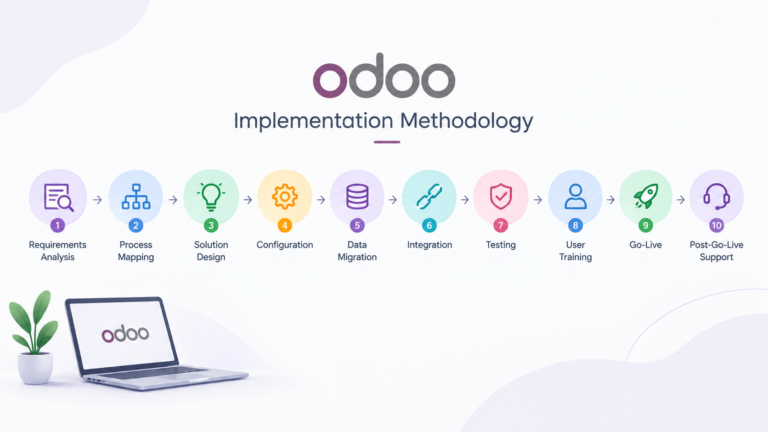
A successful integration or migration should follow a structured process.
Step 1: Understand the Existing System
We first identify how the business currently uses sevDesk and which processes will move to Odoo.
Step 2: Define the Target Odoo Architecture
The next step is determining which Odoo applications and workflows are required.
Step 3: Analyze the Data
Existing sevDesk data is reviewed for quality, duplicates, missing information, and inconsistencies.
Step 4: Map the Data
Source fields are mapped to their corresponding Odoo fields, models, accounts, taxes, and relationships.
Step 5: Configure Odoo
The Odoo database is configured according to the business requirements and applicable accounting setup.
Step 6: Develop or Configure the Integration
Where standard integration functionality is insufficient, a custom connector can be developed.
Step 7: Perform a Test Migration
A representative dataset is migrated into a test environment.
Step 8: Reconcile the Results
Record counts, invoices, payments, accounts, taxes, and financial totals are checked.
Step 9: Perform the Final Migration
After user acceptance testing, the final migration is performed.
Step 10: Go Live and Monitor
The production system and integrations are monitored after go-live to identify and resolve issues quickly.
Benefits of Integrating Odoo With sevDesk
A well-designed integration can provide several operational benefits.
Reduced Manual Data Entry
Employees do not need to recreate the same financial information in multiple systems.
Better Data Consistency
Defined mappings help maintain consistent customer, vendor, invoice, and accounting information.
Improved Business Visibility
Odoo can provide a broader view of operational processes across sales, inventory, purchasing, CRM, and other departments.
Easier Scaling
As transaction volumes increase, automation can reduce the amount of repetitive administrative work.
Better ERP Integration
Instead of treating accounting as a separate process, financial workflows can be connected with operational activities.
Should You Migrate From sevDesk to Odoo or Integrate Both?
There are two common approaches.
Option 1: Migrate From sevDesk to Odoo
This approach may be appropriate when the company wants Odoo to become the primary ERP and accounting platform.
Benefits can include:
One central system
Fewer integrations
Centralized reporting
Unified business processes
Reduced system complexity
Option 2: Keep sevDesk and Integrate It With Odoo
This approach may be appropriate when the company wants Odoo for operational management while retaining an existing accounting workflow.
Benefits can include:
Lower disruption
Existing accounting processes can remain
Odoo can manage broader ERP functions
Gradual transition
The right choice depends on the company’s accounting setup, business processes, data requirements, and long-term ERP strategy.
Common Odoo Implementation Mistakes in Germany
Choosing the Accounting Structure Too Late
The chart of accounts and accounting setup should be decided before transactions are posted.
Migrating Data Without Cleaning It
Poor source data creates problems in the new ERP.
Building the Integration Before Defining Ownership
Every important data type should have a clearly defined source of truth.
Over-Customizing Odoo
Standard Odoo functionality should be evaluated before developing custom modules.
Ignoring the Tax Advisor
Accounting workflows should be reviewed with the company’s Steuerberater.
Not Testing Historical Data
Migration testing should include realistic historical records, not just a handful of sample invoices.
Treating Go-Live as the End
Post-go-live monitoring and support are important parts of an ERP implementation.
Odoo Implementation in Germany: What Should You Plan Before Starting?
Before beginning an implementation, businesses should answer:
Which Odoo modules are required?
Will Odoo replace sevDesk or work alongside it?
Which system will be the source of truth?
How much historical data needs to be migrated?
Which chart of accounts will be used?
Is DATEV part of the accounting workflow?
What German e-invoicing requirements apply?
Which processes should be automated?
What integrations are required?
Who will validate the accounting configuration?
Answering these questions early can significantly reduce implementation risks.
Conclusion
A successful Odoo implementation in Germany requires more than configuring ERP modules. Businesses need to plan their accounting structure, data migration, integrations, automation, reporting, and long-term support.
For companies using sevDesk, the choice does not always have to be between keeping sevDesk or immediately replacing it. Depending on the business requirements, sevDesk can be integrated with Odoo, or historical data can be migrated so that Odoo becomes the central ERP platform.
At Mediod Consulting, we work on Odoo implementation, customization, integration, and migration projects involving complex business processes and third-party systems.
If your company is considering moving from sevDesk to Odoo or connecting sevDesk with Odoo, we can help assess the existing system, define the migration strategy, map the data, and design the appropriate integration approach.
Frequently Asked Questions
Can Odoo integrate with sevDesk?
+
Yes. An Odoo and sevDesk integration can be designed to synchronize selected business and accounting data. The exact synchronization depends on the required workflow and integration architecture.
Can I migrate from sevDesk to Odoo?
+
Yes. sevDesk data can be analyzed, cleaned, mapped, and migrated to Odoo. The migration scope should be defined based on the historical and operational data the business needs in the new ERP.
Does Odoo support German accounting?
+
Yes. Odoo’s German fiscal localization supports SKR03 and SKR04 and includes Germany-specific accounting reports in Odoo Enterprise.
Does Odoo support DATEV?
+
Odoo’s German localization supports DATEV ATCH and DATEV DATA exports for transferring accounting information and associated documents into DATEV workflows.
What is the difference between Odoo and sevDesk?
+
sevDesk is primarily focused on accounting and business administration, while Odoo provides a broader ERP platform covering areas such as CRM, sales, purchasing, inventory, manufacturing, ecommerce, projects, and accounting.
Should I replace sevDesk with Odoo?
+
Not necessarily. The right approach depends on your accounting workflow, business requirements, integrations, historical data, and long-term ERP strategy. Some businesses may benefit from migrating fully to Odoo, while others may prefer integrating Odoo with their existing accounting system.
Does Odoo support German e-invoicing?
+
Odoo can be configured for relevant e-invoicing workflows, but businesses should assess the specific requirements applicable to their transactions and implementation. German B2B e-invoicing rules began taking effect on January 1, 2025, with transitional provisions for issuing e-invoices.
How long does an Odoo migration from sevDesk take?
+
The timeline depends on the amount and quality of data, the number of business processes, accounting requirements, integration complexity, historical records, and testing requirements. A small migration can be significantly simpler than a full ERP transformation.
Why should I use an Odoo implementation partner?
+
An experienced implementation partner can help with business process analysis, Odoo configuration, German localization, data migration, custom development, integrations, testing, training, and post-go-live support.
Get Started with Mediod Consulting
Migrating from sevDesk to Odoo, or connecting the two, involves real complexity around German accounting rules, DATEV, and e-invoicing — not something to get wrong. Mediod Consulting has already built this exact integration for a client. Book a free consultation and we’ll walk through your current sevDesk setup and what migrating or integrating would actually involve.
Prefer to see Odoo’s accounting and invoicing tools yourself first? Explore Odoo Invoicing — sign up through that link and email info@mediodconsulting.com for a 22% discount on your subscription, before or after you buy.

Ayesha Wajid
Ayesha Wajid writes about Odoo ERP implementation, business process automation, and digital transformation at Mediod Consulting.