
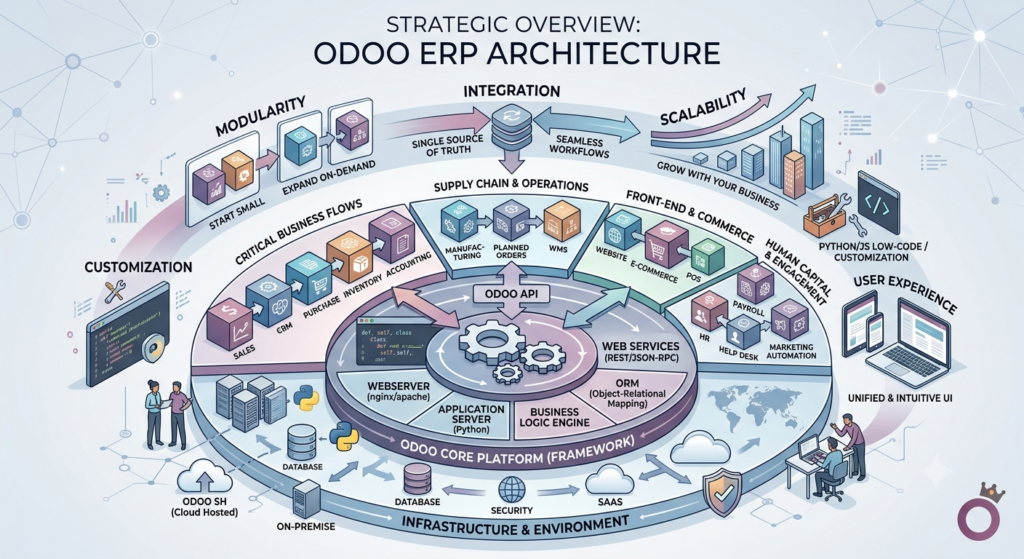
Strategic Overview of Odoo ERP Architecture
Enterprise Resource Planning (ERP) technology has undergone a fundamental paradigm shift away from monolithic, rigid software structures toward modular, decoupled architectures. Odoo ERP represents a prime example of this evolution, serving as an integrated suite of business applications designed to unify disparate operational functions into a single enterprise database. The platform covers core operational domains including Customer Relationship Management (CRM), inventory management, financial accounting, human resources, manufacturing execution systems (MES), and multi-channel eCommerce.
The foundation of Odoo relies on a highly flexible, modular application framework. Rather than requiring organizations to deploy an unwieldy software footprint all at once, Odoo allows enterprises to adopt functional modules incrementally based on immediate operational priorities. Each functional app operates both as an independent solution and as a fully integrated node within the broader enterprise system. Data generated in front-end operations—such as point-of-sale transactions or online sales orders—automatically propagates through back-end modules, instantly updating inventory balances, triggering automated procurement actions, and generating corresponding financial ledger entries without human intervention.
                 +-----------------------------------+
                 |        Odoo Core Database         |
                 +-----------------+-----------------+
                                   |
        +--------------------------+--------------------------+
        |                          |                          |
+-------v-------+          +-------v-------+          +-------v-------+
|  CRM & Sales  |          |   Inventory   |          |  Accounting   |
|   Automation  |          | & Supply Chain|          |  & Financials |
+-------+-------+          +-------+-------+          +-------+-------+
        |                          |                          |
        +--------------------------+--------------------------+
                                   |
                         +---------v---------+
                         | Automated Actions |
                         | & Python ORM Rules|
                         +-------------------+
From an architectural standpoint, Odoo leverages an open-source model supported by an Object-Relational Mapping (ORM) layer written in Python, backed by a PostgreSQL relational database system. This technical foundation provides significant customizability compared to legacy enterprise platforms such as SAP or Oracle. Legacy platforms frequently demand proprietary programming languages, extensive vendor lock-in, and costly consulting engagements for basic workflow modifications. Conversely, Odoo’s architectural elasticity allows developers to extend core classes, construct tailored workflows, and implement automated business rules via Python scripts and domain parameters. This flexibility balances rapid adaptation with lower long-term total cost of ownership (TCO).
Comparative Analysis: Odoo Community vs. Odoo Enterprise
A central decision point for organizations evaluating Odoo is selecting between the two primary software tiers: Odoo Community Edition and Odoo Enterprise Edition. While both editions share the same underlying architectural core and basic database schema, they serve vastly different operational profiles, technical capabilities, and financial structures.
Odoo Community Edition is distributed as a free, open-source software suite under the GNU Lesser General Public License (LGPLv3). It provides foundational functional coverage, including standard sales management, basic inventory control, purchasing, and elementary billing. It is primarily suited for small-to-medium enterprises (SMEs) possessive of in-house technical resources or those operating on strict capital constraints, who are capable of self-hosting, managing server infrastructure, and maintaining codebases independently. However, the Community Edition lacks advanced features such as double-entry accounting automation, dynamic financial reporting, complex manufacturing planning (MRP II), full mobile application access, and automated multi-company consolidation.
Odoo Enterprise Edition operates on a commercial, proprietary SaaS subscription pricing model. It encompasses all core modules from the Community version while unlocking enterprise-grade functionality, including advanced accounting frameworks, Odoo Studio (a low-code customization tool), barcode operational integration, automated shipping connectors, and dedicated vendor support. The Enterprise tier is engineered for scaling organizations that require out-of-the-box regulatory compliance, automated data workflows, complex supply chain routing, and vendor-backed security updates.
| Strategic Criteria | Odoo Community Edition | Odoo Enterprise Edition |
| Licensing Model | Open-source (LGPLv3); zero software license fee. | Commercial SaaS subscription; per-user licensing. |
| Hosting Options | On-Premise or self-managed Cloud Infrastructure (IaaS) only. | Odoo Online (SaaS), Odoo.sh (PaaS), or On-Premise. |
| Accounting Capability | Basic invoicing and payment recording; limited ledger features. | Full double-entry accounting, dynamic financial reports, automated bank feeds. |
| Customization Tools | Manual code modification in custom Python/XML modules. | Access to Odoo Studio (low-code GUI) and custom code deployment. |
| Mobile Access | Web-browser responsive interface. | Native Android and iOS mobile applications. |
| Vendor Support | Community forums and open-source documentation. | Direct vendor SLA, automated bug fixes, and upgrade scripts. |
| Advanced Features | Basic inventory tracking, simple POS, manual warehouse routing. | Multi-warehouse routing, MRP II, PLM, IoT box integration, GoBD compliance tools. |
The choice between Community and Enterprise depends heavily on an organization’s internal technical capabilities and operational complexity. Organizations opting for Community often incur hidden long-term operational costs due to the necessity of building and maintaining custom code for missing enterprise capabilities, such as advanced financial management or automated warehousing. Conversely, Enterprise converts development overhead into predictable operational expenditure, allowing companies to focus on business growth rather than infrastructure maintenance.
Deployment Topologies and Infrastructure Strategies
Selecting an appropriate deployment model is essential for system stability, performance optimization, and legal compliance. Odoo provides three distinct deployment topologies, each catering to different organizational operational models and infrastructure strategies.
Odoo Online (SaaS)
Odoo Online is a fully managed cloud service hosted directly by Odoo. This model operates as a turn-key Software-as-a-Service solution, handling server administration, security patching, backup protocols, and version upgrades automatically. It is optimized for smaller organizations seeking rapid deployment with zero IT infrastructure footprint. However, the key limitation of Odoo Online is its restriction against custom code execution; organizations cannot install third-party applications from the Odoo App Store or deploy custom-coded Python modules, limiting customization strictly to out-of-the-box configurations.
Odoo.sh (PaaS)
Odoo.sh is a specialized Platform-as-a-Service engineered specifically for custom Odoo Enterprise deployments. Hosted on cloud infrastructure, Odoo.sh bridges the simplicity of SaaS with the technical flexibility of on-premise environments. It integrates directly with GitHub repositories, establishing automated continuous integration and deployment (CI/CD) pipelines. Whenever developers commit custom code or third-party modules to a repository branch, Odoo.sh automatically spins up isolated staging instances to run automated tests before merging to production. This deployment model is optimal for growing and mid-market enterprises requiring bespoke functionality, custom API integrations, and robust staging environments without the management overhead of raw server infrastructure.
On-Premise and Private Cloud Infrastructure
The On-Premise deployment model involves installing Odoo directly on an organization’s private servers or dedicated Cloud Infrastructure-as-a-Service (IaaS) instances, such as AWS, Google Cloud, or Microsoft Azure. This topology grants complete control over data residency, database tuning, network access control, and hardware resource allocation.
On-Premise environments are critical for enterprise clients operating in strictly regulated industries, such as public sector entities, financial institutions, and European healthcare providers. For instance, enterprises operating in Germany must comply with strict GoBD guidelines governing the immutable record-keeping of electronic accounting records. Hosting Odoo on local, compliant servers in Hessen or regional German data centers ensures adherence to localized tax laws, data protection regulations (GDPR), and strict auditability standards that off-the-shelf global SaaS instances may not fully support.
Implementation Lifecycle and Functional Governance
The implementation of an ERP system is fundamentally a business transformation process rather than a mere IT installation. Failed ERP initiatives typically result from inadequate process alignment, scope creep, and unmanaged organizational inertia. Successful deployment requires a structured methodology spanning detailed business process analysis, multi-phase rollout strategy, and strategic governance regarding system customization.
The standard implementation progression transitions systematically through distinct structural stages:
- Foundation and Lead-to-Cash Setup: Initial baseline configuration establishing core organizational parameters, user security roles, customer relationship management, sales pipeline rules, and primary invoicing structures.
- Operational Core and Supply Chain Deployment: Execution of inventory management, warehouse routing, vendor procurement, and material tracking protocols across operational facilities.
- Financial Governance and Enterprise Expansion: Integration of double-entry general ledger accounting, automated financial reconciliation, manufacturing execution systems (MES), and executive analytics.
Business Process Analysis and Requirements Mapping
Before configuring the system, functional consultants conduct an exhaustive analysis of the organization’s existing business workflows. This phase involves mapping the complete lifecycle of operational transactions, such as the exact progression from lead acquisition to sales quote, sales order, delivery order, and final invoice generation. Consultants evaluate warehouse operations, multi-currency accounting requirements, management reporting needs, and legacy software dependencies.
The primary objective of this phase is to eliminate operational redundancies, identify manual tasks suitable for automated processing, and establish clear functional boundaries. By establishing a comprehensive architectural blueprint early, companies prevent costly structural adjustments during later phases of deployment.
Phased Implementation Strategy
Deploying a comprehensive ERP platform across an entire enterprise simultaneously introduces significant operational risk. Leading practices favor a phased implementation roadmap, introducing functional capabilities iteratively to manage organizational change and ensure system stability.
| Implementation Phase | Operational Focus | Core Modules Deployed | Strategic Objective |
| Phase 1: Foundation | Front-Office Operations & Revenue Capture. | CRM, Sales, Invoicing, Customer Portal. | Streamline lead-to-quote conversion, establish centralized customer data, and digitize billing workflows. |
| Phase 2: Supply Chain | Back-Office Logistics & Inventory Governance. | Inventory, Purchase, Vendor Management, Barcode. | Achieve real-time stock visibility across warehouses, automate purchase orders, and optimize fulfillment. |
| Phase 3: Deep Financials & MES | Operations, Costing, & Enterprise Intelligence. | Advanced Accounting, MRP II, PLM, Business Intelligence. | Automate financial ledger reconciliation, control manufacturing schedules, and deliver executive dashboards. |
| Phase 4: Ecosystem Expansion | External Channels & Custom Extensions. | eCommerce, Payment Connectors, Logistics APIs, Custom Apps. | Synchronize multi-channel sales environments, integrate third-party platforms, and launch advanced KPIs. |
The Customization vs. Configuration Paradigm
One of the most critical governance decisions in an Odoo project is managing the boundary between native software configuration and custom software development. Configuration involves adjusting Odoo’s built-in parameters, automated actions, access rights, and standard settings to fit operational workflows. Customization involves writing custom Python code, modifying database schemas, or building bespoke software modules from scratch.
While Odoo’s open-source architecture makes technical customization highly accessible, excessive custom development creates substantial long-term friction. Over-customized databases often face technical debt, performance bottlenecks, and complicated version upgrades. Consequently, expert implementation strategies advocate for a “configuration-first” methodology. Standard out-of-the-box workflows should be utilized wherever possible, reserving custom code deployment exclusively for scenarios where a company possesses a truly unique, competitive workflow or requires specialized industry integrations.
Ecosystem Integration and Data Synchronization
Modern enterprises rarely rely on a single isolated software platform. Operations typically depend on a network of specialized applications across multi-channel retail, payment processing, shipping logistics, legacy accounting, and specialized marketing tools. Odoo’s primary value proposition in complex environments lies in its ability to serve as a central integration hub, orchestrating real-time data flow across external systems through automated service links and structured API endpoints.
Digital Commerce and Omnichannel Synchronization
For commercial operations managing multi-channel sales environments, connecting front-end retail channels with back-end inventory management is critical. Odoo integrates seamlessly with digital commerce platforms including Shopify, WooCommerce, and Magento.
Through bidirectional API connectors, online sales orders placed on an e-commerce platform automatically trigger sales order creation within Odoo. This automated workflow instantly reserves stock within the centralized inventory database, preventing stockouts across disparate sales channels. Once warehouse personnel fulfill the shipment, tracking parameters generated in Odoo are pushed back to the front-end e-commerce store, updating the end customer in real time.
Localized Financial and Payment Gateway Bridging
While Odoo Enterprise features a complete double-entry financial accounting system, enterprise clients frequently require integration with specialized regional accounting solutions or legacy financial platforms such as QuickBooks, Xero, or localized European tools like sevDesk.
Integrating Odoo with platforms like sevDesk allows multinational organizations operating in Europe to leverage Odoo for global operational control, inventory routing, and sales pipeline management, while offloading localized tax filings and regional compliance reporting to dedicated local platforms. Furthermore, integrating payment gateways—such as Stripe, PayPal, and Razorpay—ensures that incoming transaction settlements are automatically matched against open invoices, eliminating manual financial reconciliation.
Logistics, Freight, and Custom API Ecosystems
Supply chain efficiency depends heavily on real-time integration with shipping carriers and third-party logistics (3PL) providers. Odoo connects directly with global shipping services such as DHL, FedEx, UPS, and ShipStation. When a pick and pack operation is completed in Odoo’s inventory module, the integration automatically transmits parcel dimensions and delivery destinations to the carrier’s API, generating shipping labels, tracking numbers, and rate calculations within Odoo.
When proprietary or industry-specific software must be connected, techno-functional development teams utilize custom API bridges. By developing tailored RESTful or XML-RPC connectors, external enterprise applications can query, create, or update Odoo database records securely, ensuring consistent data synchronization across the entire enterprise ecosystem.
Version Migration, Technical Upgrades, and Next-Generation Capabilities
Odoo operates on an annual software release cycle, unveiling a major version update every autumn. Each iteration introduces updated user interfaces, performance optimizations, security improvements, and new functional modules aligned with broader industry trends. Consequently, maintaining a modern Odoo environment requires a proactive version migration strategy.
The transition between major framework versions relies on two synchronized operational paths:
- Database Migration and Schema Transformation: Structural remapping of core relational tables in PostgreSQL, ensuring raw records, financial ledgers, and operational histories transfer safely to the target schema without data corruption.
- Code Migration and API Refactoring: Technical adaptation of bespoke modules, third-party applications, and user interface templates to maintain complete execution compatibility with updated backend APIs.
System Migration Architecture
Migrating an enterprise ERP instance from a legacy release (e.g., Odoo 14 or 15) to a modern platform (e.g., Odoo 19) involves a dual-layered technical process: Database Migration and Code Migration.
- Database Migration: The underlying PostgreSQL database structure undergoes schema transformations to align with the relational data models of the target Odoo version. Data tables containing customer records, historical product ledgers, asset valuations, and past invoices must be sanitized, restructured, and mapped accurately to preserve historical data integrity with zero data loss.
- Code Migration: Custom-developed Python modules, views, and third-party app integrations must be rewritten or refactored. Deprecated core APIs, modified framework methods, and altered XML views present in older versions are updated to ensure full compatibility with the new framework execution layer.
Modern Framework Enhancements and Performance Suites
Recent iterations of the platform have overhauled the user interface layer, transitioning frontend components to the Odoo Web Library (OWL)—a custom, high-performance reactive JavaScript framework. OWL drastically improves client-side execution speeds, providing real-time data visualization and interactive user interfaces.
For example, specialized extension suites such as Sales KPI Pro leverage Odoo 19’s OWL components to deliver advanced performance dashboards, gamified team leaderboards, target management wizards, and automated predictive revenue forecasting. By calculating live win/loss ratios, average deal sizes, and conversion trends directly against CRM opportunities, modern Odoo environments transform operational tracking into forward-looking business intelligence.
Emerging Technological Trajectories
The technical trajectory of the Odoo platform increasingly incorporates intelligent automation and machine learning components. Future functional enhancements focus on:
- AI-Powered Analytics: Automated financial anomaly detection, intelligent OCR-driven invoice parsing, and predictive customer churn modeling.
- Advanced Inventory Forecasting: Machine learning algorithms analyzing historical demand seasonality, lead times, and supply chain disruptions to optimize automated reordering rules.
- Hyper-Automated Commerce: Integrated marketing automation engines and automated omnichannel customer engagement mechanisms linked directly to back-end stock allocations.
Strategic Recommendations and Organizational Synthesis
Implementing Odoo ERP offers growing enterprises a powerful path toward operational unification, automated workflow execution, and real-time business visibility. However, extracting maximum return on investment (ROI) from an enterprise platform requires structured governance, clear architectural vision, and seasoned implementation expertise.
Organizations embarking on an Odoo transformation initiative should adhere to four overarching strategic principles:
- Conduct Rigorous Pre-Implementation Audits: Thoroughly document existing business processes and pain points before writing code or selecting specific modules. Establish clear functional requirements to avoid scope creep and unexpected development overhead.
- Prioritize Configuration Over Customization: Adopt standard out-of-the-box functional workflows wherever possible. Minimize custom Python development to protect the database architecture, lower system maintenance overhead, and ensure seamless annual version upgrades.
- Adopt a Phased Deployment Approach: Avoid high-risk enterprise launches. Implement core foundational modules (e.g., Sales, Invoicing, CRM) first, ensuring organizational adoption before expanding into complex supply chain management, MRP, or bespoke API integrations.
- Partner with Accredited Techno-Functional Experts: Engage certified Odoo implementation partners who bring deep technical expertise, industry domain experience, and local compliance knowledge. Professional techno-functional teams bridge the gap between abstract business goals and concrete software configurations, ensuring the platform scales reliably as a strategic growth engine.