
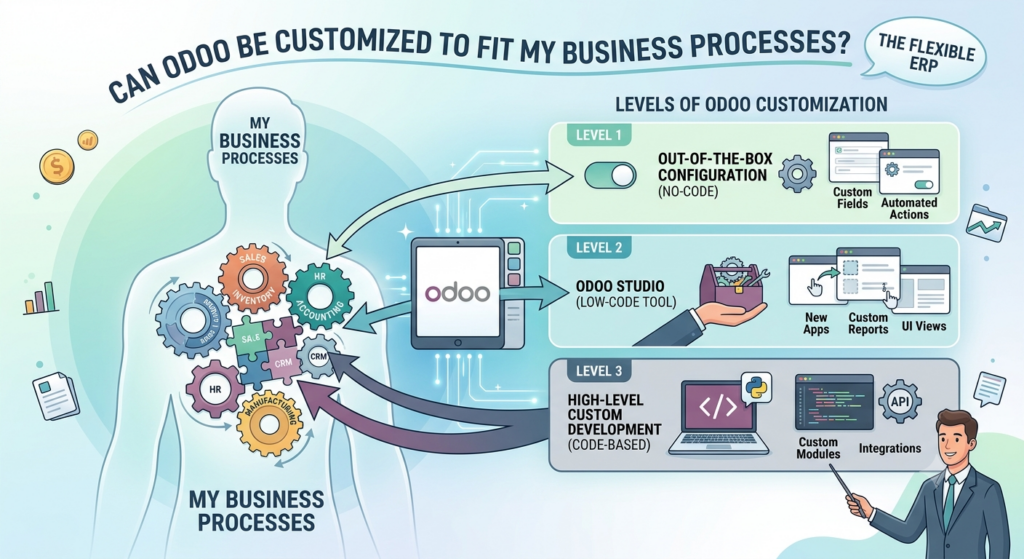
One of the most common questions businesses ask before choosing Odoo is: “Can Odoo be customized to fit my business processes?”
The short answer is yes. Odoo is highly flexible and can be configured, extended, and customized to support many different business processes and industries.
However, customization should not always be the first solution.
A successful Odoo implementation starts by understanding how your business operates and then determining whether the requirement can be handled through standard Odoo configuration, Odoo Studio, third-party applications, or custom development.
At Mediod Consulting Pvt Ltd, we help businesses determine the right level of Odoo customization so they can improve their processes without creating unnecessary complexity or expensive maintenance.
Can Odoo Adapt to My Business Processes?
Yes. Odoo can support a wide range of business processes across industries such as:
- Manufacturing
- Construction
- Retail
- Ecommerce
- Professional services
- Distribution
- Hospitality
- Real estate
- Wholesale
- Logistics
- Healthcare
- Automotive
Odoo includes applications for:
- CRM
- Sales
- Purchase
- Inventory
- Accounting
- Manufacturing
- Project management
- HR
- Payroll
- Website
- Ecommerce
- Point of Sale
- Marketing
Most businesses can configure standard Odoo functionality to cover a significant portion of their requirements.
For requirements that are not available out of the box, Odoo provides several customization options.
Odoo Configuration vs Customization
Before developing anything, it is important to understand the difference between configuration and customization.
Odoo Configuration
Configuration means using Odoo’s existing functionality and settings to adapt the system to your business.
Examples include:
- Configuring warehouses
- Creating user roles
- Setting up approval rules
- Configuring taxes
- Creating product categories
- Setting payment terms
- Configuring sales teams
- Setting automated actions
- Creating workflows using available features
Configuration generally requires less development and is easier to maintain during future Odoo upgrades.
Odoo Customization
Customization means changing or extending Odoo beyond its standard functionality.
Examples include:
- Custom fields
- Custom business logic
- Custom workflows
- Custom reports
- Custom dashboards
- Custom documents
- New buttons or actions
- Custom modules
- API integrations
- Industry-specific functionality
Customization can be extremely useful, but it should be introduced only when there is a clear business benefit.
How Much Can Odoo Be Customized?
Odoo can be customized at several levels.
1. Custom Fields
If the standard Odoo fields do not contain information your business needs, custom fields can be added.
For example, a construction company may want fields such as:
- Project number
- Building type
- Construction phase
- Site manager
- Contract reference
- Customer approval status
These fields can be used throughout your workflows and reporting.
2. Custom Workflows
Your business may have approval processes that are different from standard Odoo workflows.
For example:
Quotation → Manager Approval → Customer Approval → Sales Order
Or:
Purchase Request → Department Approval → Finance Approval → Purchase Order
Custom workflows can help enforce these business rules within Odoo.
This can reduce dependence on emails, spreadsheets, and manual approval processes.
3. Automated Business Processes
Odoo can automate many repetitive tasks.
For example:
When a sales order is confirmed:
Sales Order → Delivery → Invoice → Payment Follow-up
A business may also require additional automation.
For example:
Sales Order Confirmed → Generate Project → Create Tasks → Assign Employees → Notify Manager
Custom automation can reduce manual work and improve process consistency.
4. Custom Reports and Dashboards
Standard Odoo reports may not always provide the exact information management needs.
Custom reporting can provide insights such as:
- Sales profitability
- Customer profitability
- Project profitability
- Product margins
- Inventory turnover
- Employee utilization
- Outstanding receivables
- Purchase performance
- Manufacturing efficiency
Custom dashboards can bring important KPIs together in one place.
5. Custom Documents
Businesses often have documents that need a specific format.
Odoo documents such as:
- Quotations
- Sales orders
- Invoices
- Purchase orders
- Delivery slips
- Credit notes
can be customized to include:
- Company branding
- Additional fields
- Terms and conditions
- Customer information
- Project information
- Product details
- Legal information
This allows Odoo-generated documents to match your business requirements.
6. Third-Party Integrations
Sometimes the requirement is not actually an Odoo customization.
Your business may need Odoo to communicate with another platform.
Examples include:
- Ecommerce platforms
- Payment gateways
- Shipping systems
- Banking platforms
- CRM systems
- Payroll providers
- Accounting systems
- Marketplace platforms
- Property management systems
- External APIs
For example:
Ecommerce Website → Odoo → Inventory → Delivery → Accounting
A properly designed integration can allow information to flow automatically between systems.
7. Custom Odoo Modules
For more complex requirements, developers can create custom Odoo modules.
A custom module can introduce:
- New models
- New fields
- New workflows
- New business logic
- New menus
- New reports
- New automated processes
- Integration functionality
This approach is useful when your business has requirements that cannot reasonably be handled through standard configuration.
Should I Customize Odoo or Change My Business Process?
This is one of the most important questions during an Odoo implementation.
Businesses sometimes say:
“Our current system works this way, so Odoo must work exactly the same way.”
That approach can result in unnecessary customization.
Instead, an experienced Odoo consultant should ask:
“Why does your business process work this way?”
There may be a simpler way to achieve the same business outcome using standard Odoo.
For example, a company may currently use:
Excel → Email → Manual Approval → ERP Entry
Odoo could potentially replace this with:
Odoo Request → Approval → Automated Purchase Order
The goal should not be to reproduce every limitation of your old system.
The goal should be to build a better business process using Odoo.
When Should You Customize Odoo?
Customization can make sense when the requirement:
- Provides significant business value
- Gives your company a competitive advantage
- Is necessary for legal or regulatory reasons
- Is essential to your industry
- Cannot reasonably be achieved through standard Odoo
- Saves significant manual work
- Improves data accuracy
- Enables an important integration
For example, a company may have a specialized pricing calculation that is central to how it operates.
If Odoo cannot handle the calculation through standard configuration, custom development may be justified.
When Should You Avoid Odoo Customization?
Customization may not be appropriate when:
- Standard Odoo already provides the functionality
- The requirement is only a user preference
- The process can easily be changed
- A reliable existing Odoo application provides the functionality
- The customization would be difficult to maintain
- The business benefit is very small
- The customization is being requested simply because the old ERP worked differently
Every customization has a potential long-term cost.
The initial development may be inexpensive, but future maintenance and upgrades should also be considered.
What Is Odoo Studio?
Odoo Studio provides a visual way to customize Odoo without traditional software development for many common requirements.
Depending on the Odoo version and use case, Studio can help businesses add or modify:
- Fields
- Views
- Forms
- Automated actions
- Approval flows
- Reports
- Website elements
For example, if your sales team needs a new field on a quotation, this may be achievable without developing a complete custom module.
Odoo Studio can therefore be useful for relatively simple customizations.
However, complex business logic or integrations may still require professional Odoo development.
Does Odoo Customization Increase Implementation Costs?
Yes, customization can increase the cost of an Odoo implementation.
The cost depends on:
- Complexity
- Development effort
- Number of workflows
- Number of modules affected
- Integration requirements
- Testing requirements
- Documentation
- Future maintenance
A small custom field may require very little effort.
A complex integration involving multiple systems may require significant development and testing.
This is why businesses should identify customization requirements during the Odoo discovery and planning phase.
Does Odoo Customization Affect Future Upgrades?
It can.
This is an important consideration when developing custom Odoo functionality.
Odoo releases new versions and updates its framework over time. Custom modules may need to be reviewed and updated when upgrading to a newer version.
For example:
Odoo 18 Custom Module → Odoo 19 Upgrade
The custom module may require compatibility changes depending on what has changed in Odoo.
Poorly designed customizations can make upgrades more difficult and expensive.
Professional Odoo development should therefore consider:
- Maintainability
- Upgrade compatibility
- Code quality
- Documentation
- Testing
- Dependencies
The objective should be to create custom functionality that is useful today without creating unnecessary technical debt tomorrow.
Can Odoo Be Customized for Small Businesses?
Absolutely.
Small businesses sometimes assume customization is only for large companies.
That is not the case.
A small business might need a simple customization such as:
- Custom quotation fields
- Additional approval
- Special invoice information
- Industry-specific reports
- Automated customer notifications
- Custom pricing rules
However, small businesses should be particularly careful about unnecessary customization because they usually have limited budgets and internal technical resources.
For smaller companies, the best strategy is often:
Standard Odoo → Configuration → Studio → Third-Party App → Custom Development
Use the simplest solution that meets the requirement.
Can Odoo Be Customized for Large Businesses?
Yes. Odoo can also be extended for larger organizations with more complex processes.
Large implementations may involve:
- Multiple companies
- Multiple warehouses
- Complex accounting
- Manufacturing
- Advanced approval workflows
- External integrations
- Large-scale data migration
- Custom reporting
- Ecommerce
- Multiple currencies
- Advanced access controls
In these situations, proper architecture becomes extremely important.
The implementation team needs to understand not only the current requirements but also how the system will scale.
Examples of Odoo Customization
Here are some practical examples.
Construction Company
A construction company may require:
Quotation → Contract → Project → Tasks → Timesheets → Costs → Invoice
Custom project fields and reporting can provide management with better visibility into project profitability.
Manufacturing Company
A manufacturer may require:
Sales Order → Manufacturing Order → Quality Check → Stock → Delivery
Custom quality or production workflows can be added when standard functionality does not meet the requirement.
Ecommerce Business
An ecommerce company may require:
Website Order → Odoo Sales → Inventory → Shipping → Invoice
Custom integrations can synchronize orders, stock, shipping information, and payments.
Service Company
A service company may need:
Lead → Opportunity → Quotation → Project → Timesheet → Invoice
Automating project creation and employee assignment can reduce administrative work.
How to Approach Odoo Customization Correctly
A good customization strategy should follow a structured process.
Step 1: Understand the business requirement
Define what the business actually needs.
Step 2: Review standard Odoo
Determine whether Odoo already provides the functionality.
Step 3: Evaluate configuration
Check whether configuration can solve the requirement.
Step 4: Consider Odoo Studio
For simple changes, Studio may be sufficient.
Step 5: Evaluate third-party applications
A reliable existing application may solve the requirement.
Step 6: Develop custom functionality
Only when necessary, build a custom module or integration.
Step 7: Test thoroughly
Test the customization with real business scenarios.
Step 8: Document the solution
Document what was changed and why.
This process helps control both implementation cost and future maintenance.
How Mediod Consulting Helps With Odoo Customization
At Mediod Consulting Pvt Ltd, we take a practical approach to Odoo customization.
We first evaluate whether your requirement can be handled through standard Odoo functionality.
Where possible, we use:
Configuration → Odoo Studio → Existing Apps → Custom Development
This helps businesses avoid unnecessary customization while still allowing Odoo to support important business-specific processes.
Our Odoo services include:
- Odoo implementation
- Odoo customization
- Odoo Studio
- Custom Odoo module development
- Odoo API integrations
- Data migration
- Accounting configuration
- CRM and Sales
- Inventory and Purchase
- Manufacturing
- Project management
- HR and Payroll
- Ecommerce
- Custom reports and dashboards
- Odoo upgrades
- Ongoing Odoo support
Our objective is to build an Odoo system that fits your business without making the system unnecessarily complicated.
Frequently Asked Questions About Odoo Customization
Can Odoo be customized for any business?
Odoo is highly flexible and can be adapted to many industries and business models. However, the amount of customization required depends on how closely your processes align with standard Odoo functionality.
Can I customize Odoo without coding?
Yes. Odoo configuration and Odoo Studio can handle many simpler customization requirements without traditional programming.
Does Odoo support custom workflows?
Yes. Odoo workflows can often be configured or extended to support business-specific approval and operational processes.
Can Odoo integrate with other software?
Yes. Odoo can integrate with external systems through APIs, connectors, and custom integrations.
Is Odoo customization expensive?
It depends on the complexity of the requirement. Simple changes can require limited effort, while complex custom modules and integrations can require substantial development and testing.
Is it better to customize Odoo or use standard functionality?
Standard functionality should generally be considered first. Customization is most appropriate when it provides meaningful business value or is necessary to support a specific requirement.
Will customization affect Odoo upgrades?
Potentially. Custom modules and modifications may need to be reviewed and updated when moving to a newer Odoo version. Good development practices can reduce upgrade complexity.
Final Thoughts
Can Odoo be customized to fit your business processes? Yes.
But the better question is:
“What is the simplest way to make Odoo support our business?”
Not every difference between your current system and Odoo requires custom development.
An experienced Odoo implementation partner should first evaluate standard functionality, configuration, Studio, and existing applications before recommending custom development.
The right balance can give you a system that is:
- Flexible
- Scalable
- Cost-effective
- Easier to maintain
- Easier to upgrade
- Better aligned with your business
If your business has unique workflows or processes and you are unsure whether Odoo can support them, Mediod Consulting Pvt Ltd can help analyze your requirements and recommend the most practical Odoo solution.
Have a business process that does not fit standard Odoo? Contact Mediod Consulting Pvt Ltd to discuss your requirements.